


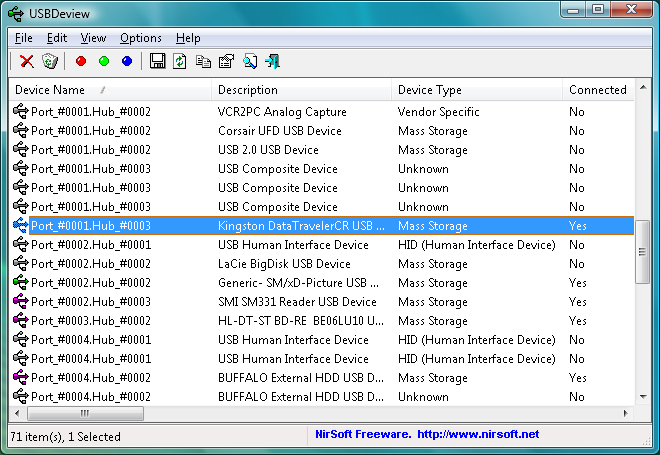
USBDeview is a small tool that allows you to manage the USB devices connected to your computer.
Launch the program and you'll get a lengthy list of every device that's even been plugged in to your system, including its description, the device type (storage, webcam, audio and so on), driver name and more.
Right-click a USB drive, say, and you'll find an option to disconnect it, allowing you to unplug the drive safely. You're able to disable a device, just temporarily, if it's conflicting with other software or hardware. And if you no longer use a device, then right-click its entry, select Uninstall and Windows will remove its driver.
There's a Speed Test option that will benchmark the performance of your USB drives. This could be very handy if you're planning to use Windows ReadyBoost, for instance - it's important to pick the fastest drive you have.
And Windows experts will appreciate the right-click "Open in RegEdit" option, that launches the Registry Editor at the device entry you've specified, ready for manual editing. If you're not a Windows expert, though, be careful with this one - playing around with low-level Registry settings can seriously harm your PC.
Verdict:
A handy mix of USB-related features, with the speed test being our favourite
Your Comments & Opinion
A collection of portable apps to add to your USB drive and use on any computer
Easily transfer your favourite Linux live CD distro to a USB stick, on a Windows PC
Easily view and manage the USB devices connected to your PC
Burn images to USB keys, SD cards
Easily check the strength of many passwords stored on your PC
An automated tool for backing up and syncing file-based data.
Troubleshoot crashes on your PC
Find out everything you need to know about a domain with this tiny NirSoft tool
Major update to the portable version of the popular email client, but with a limited number of new features
Minor update to the popular email client, but with a limited number of new features
Tired of Firefox's rapid release schedule breaking extensions? Firefox ESR is here to help
An outstanding audio editor
An outstanding audio editor