From Twitter

Please wait while my tweets load

If you can't wait - jump to Twitter

See more tweets...

RSS Feed

Please wait while my feed loads

See more posts...

Newsletter

Subscribe to either one of our two newsletters for regular updates and information

Downloads newsletter

This is a weekly newsletter with download news, updates and other information

This is a monthly newsletter with software store information, offers and deals

PhraseExpress 9.1.36

Cut down on repetitive typing - and typos - with this versatile keyboard macro tool

by Mike Williams

Our Rating:
Your Rating:
Login to rate
Based on 0 ratings
License: Free, for personal-use only
Operating Systems: Windows 7 (32 bit), Windows 7 (64 bit), Windows 8, Windows Vista (32 bit), Windows Vista (64 bit), Windows XP
Requirements:
Languages: English
Software Cost: Free
Date Updated: 24 April 2013
Watchlist: Add download to my watchlist
Downloads To Date: 848
Developer: Bartels Media GmbH
RSS News Feed: http://twitter.com/statuses/user_timeline/64420301.rss
Twitter Feed: http://twitter.com/PhraseExpress
Buy the new TuneUp Utilities 2013 for only $16.95, with lifetime license, saving 58% from MSRP, only from store.downloadcrew.com
PhraseExpress 9
A versatile keyboard macro tool

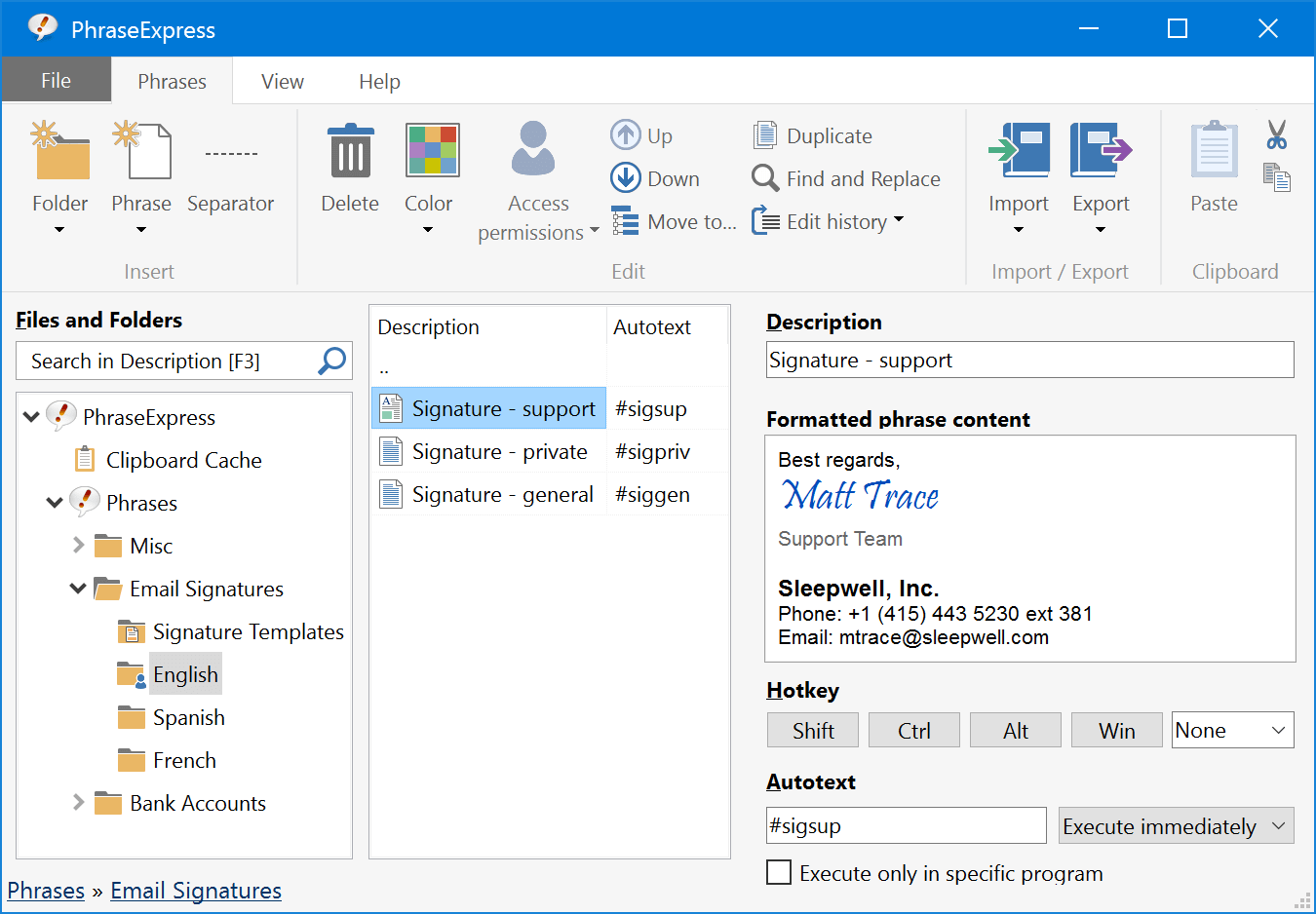
PhraseExpress is a clever text replacement tool that adds productivity-boosting features to almost every Windows application.

It can automatically expand commonly used phrases, for instance. Type "adr" and the program can replace it with your address; enter "sig" and it could be expanded to your regular signature. You're able to create as many phrases as you need, and they'll work in most Windows programs.

Automatic spell check is another useful benefit. There's nothing to set up, no options to configure, PhraseExpress simply works in the background, monitoring whatever you type, and correcting any errors as they appear. And again, this works everywhere, in Notepad, all browsers, wherever you type blocks of text.

There's a clipboard cache, which keeps track of everything you've pasted into the clipboard recently. If you'd pasted a lengthy URL to the clipboard, say, then accidentally overwritten it with something else, this isn't a problem. Just right-click the PhraseExpress system tray icon, click Clipboard Express and select the URL from the list.

The program also recognises repetitive text automatically, and can complete full sentences for you. A macro facility carries out special tasks just by typing text shortcuts, so for instance you might type "word" to launch Microsoft Word. And a comprehensive settings dialog ensures you can customise every aspect of PhraseExpress to work exactly as you'd like.

Verdict:

Simple and effective way to save time on typing, avoid typos and minimise spelling mistakes

Your Comments & Opinion
 
Related Download Articles
 
AutoHotKey's macro recorder

AutoHotkey 1.1.10.01

Open Source

Automate any task on your computer with this powerful scripting tool 

PhraseExpress 9

PhraseExpress Portable 9.1.34

Free, for personal-use only

Cut down on repetitive typing - and typos - with this versatile keyboard macro tool

WordExpander 1.5.15

WordExpander 1.5.15

Freeware

Extend AutoCorrect and AutoText to any application on your PC

Jitbit Macro Recorder 4.6

Jitbit Macro Recorder 4.6

Trial Software

Automate repetitive PC tasks by recording keypresses, mouse activity and more

Other Download Articles From This Category
Registry Key Jumper 1.0

Registry Key Jumper 1.0

Freeware

A quick and easy way to view any Registry key

Process Tamer 2.11.01

Process Tamer 2.11.01

Freeware

Optimise CPU usage by automatically adjusting process priorities

PaperScan Free 1.8.0.8

PaperScan Free 1.8.0.8

Freeware

Clean up your scanned documents with this easy-to-use tool

WinISO Standard 6.3.0

WinISO Standard 6.3.0

Trial Software

Create, open, edit, convert and otherwise work with CD, DVD and Blu-ray disc images

From Softwarecrew

Please wait while my feed loads

See more posts...

Our Price: $12.99
RRP: $39.99
Saving 68%
Buy Now More Info
Offer Ends In:
 

Spotlight: Free Full Software

Ashampoo Burning Studio 2013 (v11.0.6)

Free Full Commercial Software

Ashampoo Burning Studio 2013 is a compact, simple, but surprisingly feature-packed disc burning suite.

The program makes it easy to create simple data discs and audio CDs, for instance: just drag and drop your files onto the list area and you'll be burning the finished disc in a couple of clicks.

That's just the start, though. Burning Studio 2013 can also create data discs with customised, interactive multi-page menus, perfect if you'd like a more professional way to share and present the disc contents.

A built-in backup tool allows you to create backups which may be encrypted, compressed, and span several CDs, DVDs and Blu-rays.

And there are modules to create VCD or SVCD video projects; burn video DVDs or Blu-ray discs from prepared folders; create, browse or burn disc images (ISO, CUE/ BIN and Ashdisc formats are supported); copy discs, erase them, design and print disc covers, labels and booklets, and more.

The focus throughout is on ease of use, though, and so Ashampoo Burning Studio 2013 remains very straightforward, whatever you're doing. Most disc projects are created via the same simple interface, and for the most part all you have to do is drag and drop the necessary files. But experts will find more advanced options are only a click away, and if you need to then you can set ISO and UDF version, enable Joliet, make a disc bootable and more.

Note the download here will take you to the Downloadcrew Software Store where you can download Burning Studio 2013.

[...]
Value:
Free
Rating: