


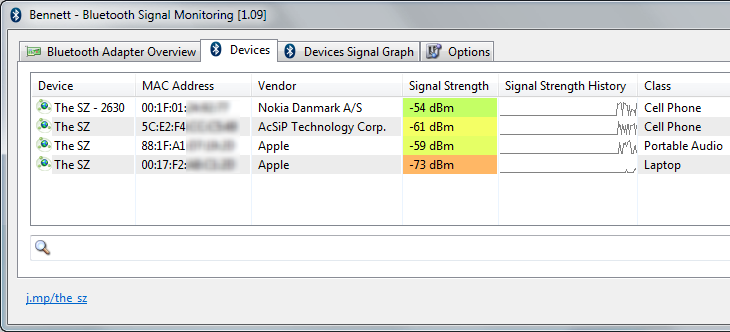
Bennett is a free tool which gives you more data on installed Bluetooth adapters, searches for Bluetooth devices and might be able to monitor their signal strength.
The program arrives as a single executable, with no installation required and no intrusive drivers or system components. Just unzip and it's ready to go.
A simple tabbed interface opens with a view of your Bluetooth adapter, including MAC address, vendor, manufacturer and more.
The Devices tab lists any detected devices along with their MAC address, vendor, device type (phone, laptop, speaker, whatever), signal strength, and a mini graph showing signal strength history over time.
If the "signal strength" isn't displayed, or is just "n/a", this means your Bluetooth stack doesn't support it.
But if you do get a figure, you're then able to view it on a larger graph, save this as an image, and/ or log the raw data to a text file.
Verdict:
Bennett can display useful extra Bluetooth details if you're using the BlueSoleil, FreeBT and Texas Instruments CC2540/41-based Bluetooth stacks. Unfortunately the Microsoft, Toshiba and Broadcom Bluetooth stacks don't report signal strength, but Bennett is entirely safe to try: if the program doesn't work for you, just delete it.
Your Comments & Opinion
Send files quickly, safely and easily between computer and mobile devices.
Send files quickly, safely and easily between computer and mobile devices.
Send files quickly, safely and easily between computer and mobile devices.
Send files quickly, safely and easily between computer and mobile devices.
Send files quickly, safely and easily between computer and mobile devices.
Use your iPhone earphone's mic as a camera shutter button
Manage your files and folders with this dual pane tabbed Explorer replacement
Find out more - much more - about your PC with this benchmarking, diagnostic and system information tool
Host a virtual operating system
Host a virtual operating system
Host a virtual operating system