


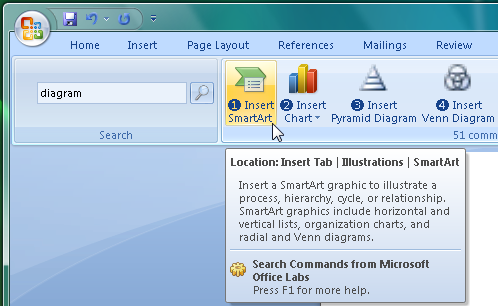
The Office 2007 ribbon was supposed to make features easier to find, but opinion is still divided on how useful it's been. Sure, it's easy to remember that the Insert tab is where you go to add pictures, chart or tables to a document, for instance, but there are plenty of lesser options that are far more difficult to locate. And so many people still find themselves poking around the ribbon tabs, clicking buttons, trying to track down the features they need,
Search Commands is a Microsoft Office Labs project that aims to change all this. It installs as an Office 2007 add-on, and adds a new "Search Commands" tab to the ribbon in Word, Excel and PowerPoint. Click this, type a word relating to the command you're looking for, like "footer", and the program will display buttons for all matching commands. Just click on the one you need to carry out that function.
Search Commands generally works very intelligently. If you enter "footer", for instance, then of course it displays commands with "footer" in the name ("View Header and Footer", "Go To Footer", and so on). But it's also smart enough to know that Header functions are related, so you'll also see commands like "Insert Header" and "Go To Header".
There are limits to its searching abilities, though. Enter "graph", for instance, and you'll see commands relating to tables, selecting and grouping objects, and so on, but not the one you might want, "Insert Chart". And so you may need to try different keywords before Search Commands locates the feature you're after.
Verdict:
Search Commands has some quirks, but overall still makes it much easier to navigate Office 2007
Your Comments & Opinion
View and edit your Word, Excel and PowerPoint files on your iOS device
Enjoy the power of Microsoft PowerPoint on your iOS device
Instantly reveal Office, Windows and other product keys
Microsoft's latest, free for everyone to try
Microsoft's latest, free for everyone to try
View, edit and annotate PDF files with this compact, fast and feature-packed tool
View, edit and annotate PDF files with this compact, fast and feature-packed tool
Powerful PDF creation, editing and management tool
A flexible video conferencing tool with support for up to 100 users for free
A flexible video conferencing tool with support for up to 100 users for free