From Twitter

Please wait while my tweets load

If you can't wait - jump to Twitter

See more tweets...

RSS Feeds

Receive a regular RSS feed from our latest, most popular and recommended downloads

Latest downloads feed

Get a regular RSS from our most latest downloads

Most popular downloads feed

Get a regular RSS from our most popular downloads

Recommended downloads feed

Get a regular RSS from our recommended downloads

Newsletter

Subscribe to either one of our two newsletters for regular updates and information

Downloads newsletter

This is a weekly newsletter with download news, updates and other information

This is a monthly newsletter with software store information, offers and deals

WinToFlash 0.7 beta

Easily create a bootable USB flash drive version of your Windows CD or DVD

by Mike Williams

Our Rating:
Your Rating:
Login to rate
Based on 1 ratings
License: Freeware
Operating Systems: Windows 7 (32 bit), Windows 7 (64 bit), Windows 8, Windows Vista (32 bit), Windows Vista (64 bit), Windows XP
Requirements:


Languages: English
Software Cost: Free
Date Updated: 21 November 2011
Watchlist: Add download to my watchlist
Downloads To Date: 18092
Developer: Novicorp
RSS News Feed:
Buy TuneUp Utilities 2012 for only $18.99, with lifetime license, saving 62% from MSRP, only from store.downloadcrew.com
WinToFlash 0.7 beta
Easily create a bootable USB flash drive version of your Windows CD or DVD

WinToFlash is an easy-to-use tool which will quickly create a bootable USB flash drive version of your Windows CD or DVD (Windows XP, 2003, Vista, 7 and 8 are supported).

This could be very useful if, say, you need to install (or reinstall) Windows on a netbook, or any other system which doesn't have a working optical drive. Or if you manage a network and are always reinstalling Windows, for instance, doing so from a USB flash drive rather than a DVD could significantly speed up the installation process.

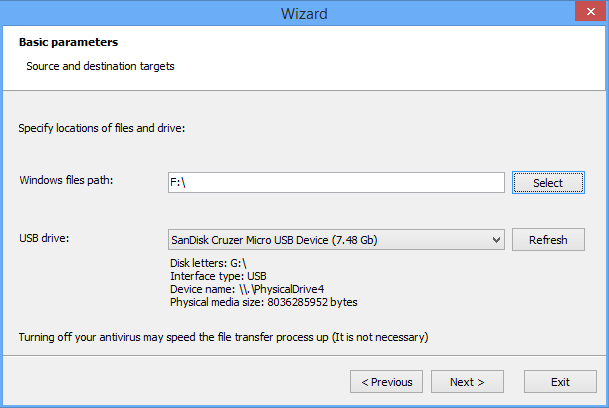
And despite the really rather complex mechanics that underpin a program like this, WinToFlash remains surprisingly straightforward. Essentially you just have to point the program at your installation DVD, and the flash drive you'd like to use, and that's about it: WinToFlash handles everything else for you.

You still have to be careful here. Your target USB flash drive will be formatted during the setup process, for instance, so any files it contains will be lost. WinToFlash will warn you about this, but plainly it's still important to make sure you select the correct drive.

And note also that this version is free for non-commercial use only, and includes ads. These are fairly unobtrusive, but if you like you can purchase a personal licence to remove them (current cost is $5.55); a Professional licence ($29.95) adds more functionality, and commercial use requires the purchase of a Business licence ($100). See the WinToFlash site for more.

Verdict:

WinToFlash provides a convenient way to speed up your Windows installations.

Your Comments & Opinion
 

A convenient tool

Posted by: Jon, 01 April 2012 12:52

WinToFlash is one of those tools you wish was existing before finding out someone actually did it.

Last year I was trying to repair a friend's computer and there was this issue: the CD/DVD player was dead. There was no way to reinstall Windows through the classical process. This tool simply saved me a lot of time and to my friend a great deal of money.

I've used this software about 10 times since then, with different Windows distributions, and it always did a good job.

Novicorp's website is displaying a top10 of the fastest USB keys. This tool works best when you use a fast key. Time wise and stability wise this tool is your best friend when it comes to reinstall a machine.

In addition I use Slysoft's Virtual CloneDrive available for free.

I only reinstall machines using the USB key. Give it a try!

Related Download Articles
 
TweakNow DriveShortcut

TweakNow DriveShortcut 1.0.0

Freeware

Automatically add removable media shortcuts to the desktop

USB Disks Access Manager 1.0

USB Disks Access Manager 1.0

Freeware

Control access to USB drives on your PCs

Windows 8 Skin Pack

Windows 8 Skin Pack 9.0 (32-bit)

Freeware

Get the look of Windows 8 for free

SSD Fresh 2012

SSD Fresh 2012 v1.0

Freeware

Take care of your SSD drive to improve performance and increase longevity

Other Download Articles From This Category
LinuxLive USB Creator 2.8.12

LinuxLive USB Creator 2.8.12

Open Source

Easily install your favourite Linux distro on a bootable USB stick

UNetbootin

UNetbootin 5.75

Open Source

Create a bootable Linux USB flash drive with (usually) the minimum of hassle

Ubuntu 12.04 LTS 64-bit

Ubuntu 12.04 Precise Pangolin [64-bit]

Open Source

A powerful yet easy-to-use Linux operating system with all the software you need

Ubuntu 12.04 LTS 32-bit

Ubuntu 12.04 Precise Pangolin [32-bit]

Open Source

A powerful yet easy-to-use Linux operating system with all the software you need

From Softwarecrew

Please wait while my feed loads

See more posts...


Spotlight: Free Full Software

Giveaway: WinISO Standard 6.1.0

Free Full Commercial Software

WinISO is a very comprehensive tool which provides everything you need to create, edit and convert disc images.

If you've an image file already, for instance (ISO, CUE/ BIN, NRG, MDF, CCD, IMG and DVD formats are supported) then you can open it in a click or two, browse the image contents, and extract the files you need with a quick drag and drop.

It's just as easy to create new ISO9660, UDF, even HFS+ images. Just choose the option you need, then either manually build up your preferred file and folder structure; drag and drop your files and folders from Explorer onto the program; or create an image directly from a CD, DVD or Blu-ray disc.

Of course you can edit images, too. Is an ISO file too large for your needs, say? Open it up, locate and remove any surplus files to free up a little space.

WinISO program has full support for reading and creating bootable image files. A simple conversion tool makes it easy to convert disc images into the format you need. And the program can even mount ISO files as Explorer files, or burn images to disc when you're ready to save them.

Please note, this trial version of WinISO Standard will not save files greater than 500MB in size.

Giveaway: on Wednesday, we're giving you the full current version of WinISO Standard 6 worth $29.95. The download link here will take you to Downloadcrew Giveaway.

[...]
Time Remaining: