From Twitter

Please wait while my tweets load

If you can't wait - jump to Twitter

See more tweets...

RSS Feeds

Receive a regular RSS feed from our latest, most popular and recommended downloads

Latest downloads feed

Get a regular RSS from our most latest downloads

Most popular downloads feed

Get a regular RSS from our most popular downloads

Recommended downloads feed

Get a regular RSS from our recommended downloads

Newsletter

Subscribe to either one of our two newsletters for regular updates and information

Downloads newsletter

This is a weekly newsletter with download news, updates and other information

This is a monthly newsletter with software store information, offers and deals

MacTubes 3.1.4

Search, view and download video from YouTube 

by Nick Peers

Our Rating:
Your Rating:
Login to rate
Based on 0 ratings
License: Open Source
Operating Systems: Mac OS X
Requirements:

OS X 10.4.2 (Tiger) or later 

Languages: English
Software Cost: Free
Date Updated: 06 April 2012
Watchlist: Add download to my watchlist
Downloads To Date: 1038
Developer: MacTubes
RSS News Feed:
Buy TuneUp Utilities 2012 for only $18.99, with lifetime license, saving 62% from MSRP, only from store.downloadcrew.com
MacTubes 3.1
Downloading video from YouTube on your Mac is simple thanks to MacTubes

If you’re a Windows user you’re spoiled for choice when it comes to finding a free tool to download (and convert) video clips from YouTube. Mac users on the other hand have a much more limited choice, but thankfully MacTubes provides such a freebie for OS X users.

MacTubes won’t automatically convert video for you, but it will give you a choice of download formats depending on what’s available – FLV (Flash) is a given, but you’ll often find MP4 and WebM formats available too. As a result, you can download the video to your Mac and then either play it in QuickTime or VLC Media Player, or convert it from FLV to MP4/M4V or MKV formats using Handbrake.

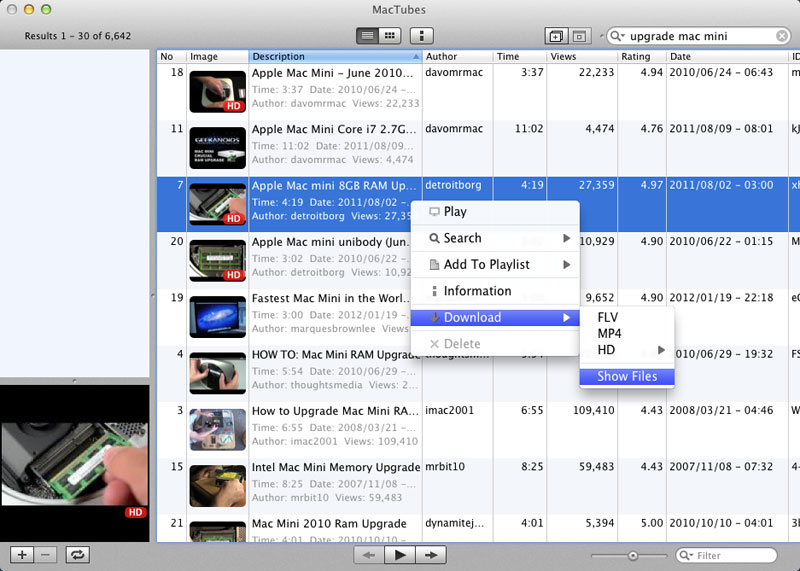
It’s very simple to use: fire the program up, place your search terms into the box and press [Enter]. After a short pause a load of potential matches will appear, complete with description, thumbnail and other helpful identifying marks. Use the Filter box on the bottom right of the window to narrow the search further.

If you can’t find the video you want, but you know it’s on YouTube somewhere, open your web browser, search YouTube for the video and then copy and paste the URL into the File > Open Video box.

Once the video has been located, right-clicking it reveals download options: FLV, MP4, HD (once enabled from the HD tab of the MacTubes > Preferences window) and a Show Files option. We recommend the latter as this reveals exactly what formats and quality settings are available, allowing you to download in your chosen file format (if supported).

Once selected, a download window will appear, indicating you can queue up multiple downloads and then get on with something else. By default, all videos are downloaded to the desktop – again you can change this from the Preferences window.

Verdict:

Beautifully executed app that makes downloading video from YouTube a simple, fuss-free experience for Mac users. 

Your Comments & Opinion
 
Related Download Articles
 
Adapter on Mac OS X

Adapter 1.4

Freeware

Quickly download and convert video and audio between different formats 

Freemake Video Downloader 3.0.1

Freemake Video Downloader 3.0.1.5

Freeware

Download clips from YouTube and other video sharing sites in just a couple of clicks

mediAvatar Free YouTube Video Download 2.0.20

mediAvatar Free YouTube Video Download 2.0.20

Freeware

Download your favourite YouTube videos in a click or two

Tube Explorer

Tube Explorer 3.2

Trial Software

Browse, download and convert videos from YouTube, Google Video and Yahoo Video and more

Other Download Articles From This Category
Plex Media Center for Windows

Plex Media Center 0.9.5.3

Freeware

Access your Plex Media Server content from your PC or Mac 

Ubiquitous Player

Ubiquitous Player 5.1

Free, for personal-use only

Personal information management, media playing, image editing, Ubiquitous Player tries to be everything to everyone

Pixelmator

Pixelmator 2.0.4

Trial Software

A powerful image editor available for a fraction of the cost of the competition

EMDB 1.48

EMDB 1.48

Freeware

Keep track of even the largest movie collection with this powerful database

From Softwarecrew

Please wait while my feed loads

See more posts...

Our Price: $89.99
RRP: $99.99
Saving 10%
Buy Now More Info
 

Spotlight: Free Full Software

Giveaway: WinISO Standard 6.1.0

Free Full Commercial Software

WinISO is a very comprehensive tool which provides everything you need to create, edit and convert disc images.

If you've an image file already, for instance (ISO, CUE/ BIN, NRG, MDF, CCD, IMG and DVD formats are supported) then you can open it in a click or two, browse the image contents, and extract the files you need with a quick drag and drop.

It's just as easy to create new ISO9660, UDF, even HFS+ images. Just choose the option you need, then either manually build up your preferred file and folder structure; drag and drop your files and folders from Explorer onto the program; or create an image directly from a CD, DVD or Blu-ray disc.

Of course you can edit images, too. Is an ISO file too large for your needs, say? Open it up, locate and remove any surplus files to free up a little space.

WinISO program has full support for reading and creating bootable image files. A simple conversion tool makes it easy to convert disc images into the format you need. And the program can even mount ISO files as Explorer files, or burn images to disc when you're ready to save them.

Please note, this trial version of WinISO Standard will not save files greater than 500MB in size.

Giveaway: on Wednesday, we're giving you the full current version of WinISO Standard 6 worth $29.95. The download link here will take you to Downloadcrew Giveaway.

[...]
Time Remaining: