


Advanced System Tweaker is a Windows tweaking tool with a couple of unusual extras.
At first glance the program doesn't look too impressive. It only comes with 37 Windows tweaks, for instance, covering the usual areas: memory optimisations, interface tweaks, networking improvements, Explorer speedups and so on.
And an inflexible interface means they're not too well presented. Most tweak descriptions are too long to view in their pane, for instance. You can't resize this or maximise the window, either, so have to scroll horizontally to read them.
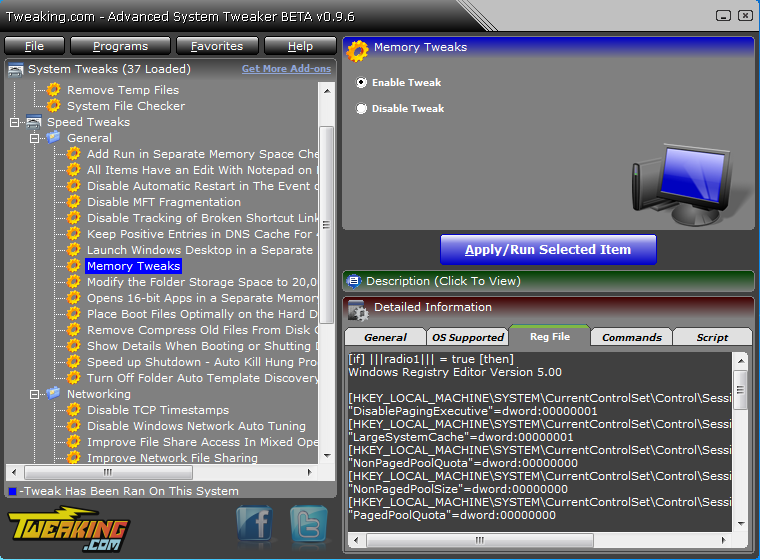
But there are good points, too. Choose an option like "Memory Tweaks", say, and the program will explain that it can speed up your PC by telling Windows to keep more items in memory. Sounds good, but if you're an expert Windows user you'll still want more information.
And you can get it, too, just by clicking the Detailed Information bar, which (amongst other data) shows you exactly which Registry settings the tweak will apply. It's the same for every tweak here: the program is completely transparent about what it's doing.
But that's not all. Advanced System Tweaker also supports "Add Ons", which means you can extend its abilities by downloading more tweaks online (well, eventually, there's only one available as we write), or creating new ones of your own. So in just a few minutes you can extend the program with many of your own favourite Windows tweaks, which could make it far more useful.
Build 2.0.0 is a major new release with these changes:
- Major program change. In the previous versions you could only run 1 tweak at a time. Now you can select the tweaks you want first and then apply them all at once.
- Multiple code changes and some minor bug fixes.
- Added frame containers and lines to the add on creator for tweaks.
Verdict:
Advanced System Tweaker includes only a few Windows tweaks right now, and its interface isn't the best. The ability to customise it with your own tweaks could be very useful, though, so if you're an expert Windows user then the program may be worth checking out.
Your Comments & Opinion
Tweak, optimise and generally discover everything there is to know about your Windows 7 PC
Some of the new Lion improvements can be distracting, use this tweaking tool to switch them off
Clean, optimise and tweak your Windows 7 system with this all-in-one maintenance suite
Tweak and customize your copy of Vista or Windows 7
Quickly tweak Windows 10 for better performance, security and accessibility
An all-in-one maintenance utility for your Mac
TotalIdea's classic PC tweaker, now available for Windows 10
Explore 100+ Windows tweaks
Quickly tweak Windows 7 and Vista for better performance, security and accessibility
Extend your command line capabilities with this powerful cmd.exe replacemen
Rename a large number of files quickly and easily
Keep your hard drive in top condition with this powerful disk defragmentation tool
Are your drivers up-to-date? Here's how to find out
Quickly compare files and folders stored in different locations.