


If you have an interest in getting the most from your computer’s hardware, you may well have tried overclocking your system to gain a little extra performance without the need to upgrade your system. Pushing hardware beyond what it was designed to be used for is slightly dangerous and it is a good idea to keep an eye on temperature levels and other information about the components you have tweaked.
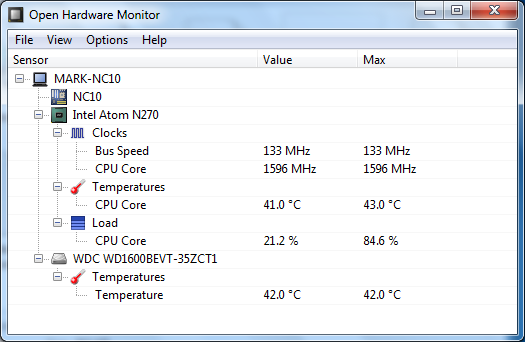
This is something that Open Hardware Monitor has been designed to help with. This easy to use, portable application makes it possible to monitor the status of all manner of hardware devices including your processor and hard drive so you can ensure that no damage is being caused to your expensive computer. If you are experimenting with overclocking, this information can help you to determine what settings it is safe for you to use.
The program can be configured to start automatically with Windows so you will always have the information you need to hand. Open Hardware Monitor makes use of SMART sensors to keep your informed of the temperature of your processor and hard drives as well as the state of your graphics card. When it comes to your processor, you can also monitor the bus and core speed as well as the overall load level.
If you would prefer not to use a standard program window to monitor your hardware, there is the option of adding a gadget to your desktop. To this you can add a number of different sensors so the information you are interested in is always to hand. The ability to view the data as a graph means that it is possible to monitor changes over time without having to manually make a note of previous levels.
What's new?
Added support for Intel Skylake, Kaby Lake and Airmont CPUs.
Added support for Intel Xeon E5-26xx v4 and Xeon D-15xx CPUs.
Added support for Intel Intel i5, i7 5xxC (14nm) CPUs.
Added support for AMD family 15h model 30h APUs.
Added support for ITE IT8620E and IT8628E super I/O chips.
Added support for Nuvoton NCT6102D/NCT6106D super I/O chips.
Added more Nvidia RAM sensors (free, used and total).
Added more sensors for Samsung and Plextor SSDs.
Replaced the ‘Temperature Difference From 100’ with a simple ‘Temperature’ sensor on hard drives.
Fixed wrong Nvidia GPU clock min and plotting values.
Fixed issues with Nuvoton NCT6791D super I/O chips after wake from S3 sleep state.
Fixed incorrect OS version showing up in reports for Windows 10 and 8.1.
Added customizable pen colors for the plot window.
Improved the automatic plot pen color assignment strategy.
Verdict:
A great tool for any hardware enthusiast, Open Hardware Monitor helps to keep your hardware within safe parameters.
Your Comments & Opinion
Monitor the temperature of your processor's cores
Push your PC to its limits to see what it can handle
Detailed system information in a desktop sidebar
Check, monitor or overclock your graphics card
Monitor the temperature of your processor
Open-source password manager goes straight to the top of the class.
The latest stable Chrome Portable includes a number of under-the-hood improvements
The latest stable Chrome Portable includes a number of under-the-hood improvements
Tired of Firefox's rapid release schedule breaking extensions? Firefox ESR is here to help
Get an in-depth technical report on your core PC hardware