From Twitter

Please wait while my tweets load

If you can't wait - jump to Twitter

See more tweets...

RSS Feeds

Receive a regular RSS feed from our latest, most popular and recommended downloads

Latest downloads feed

Get a regular RSS from our most latest downloads

Most popular downloads feed

Get a regular RSS from our most popular downloads

Recommended downloads feed

Get a regular RSS from our recommended downloads

Newsletter

Subscribe to either one of our two newsletters for regular updates and information

Downloads newsletter

This is a weekly newsletter with download news, updates and other information

This is a monthly newsletter with software store information, offers and deals

Chameleon Shutdown 1.1.1.30

Easily automate your PCs shutdown, restart, sleep, hibernate, lock or log off process

by Mike Williams

Our Rating:
Your Rating:
Login to rate
Based on 0 ratings
License: Freeware
Operating Systems: Windows 7 (32 bit), Windows 7 (64 bit), Windows Server, Windows Vista (32 bit), Windows Vista (64 bit), Windows XP
Requirements:


Languages: English, Chinese, Dutch, Hindi, Polish, Portuguese, Russian, Serbian, Slovak, Ukranian
Software Cost: Free
Date Updated: 08 March 2012
Watchlist: Add download to my watchlist
Downloads To Date: 1190
Developer: Neosoft Tools
RSS News Feed:
Buy the new TuneUp Utilities 2013 for only $16.95, with lifetime license, saving 58% from MSRP, only from store.downloadcrew.com
Chameleon Shutdown 1.1.1.30
Easily automate your PCs shutdown, restart, sleep, hibernate, lock or log off process

Chameleon Shutdown is an interesting tool that gives you greater control over how and when your PC shuts down, restarts, hibernates and so on.

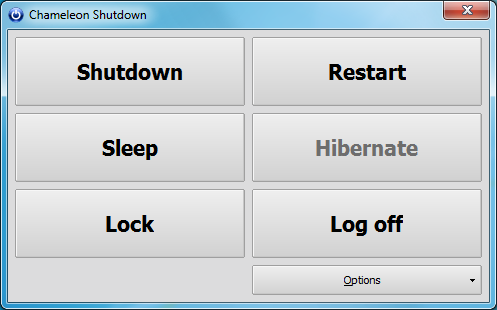
Initially the program looks a little, well, basic. It presents a simple interface with six buttons, and if you, say, click Shutdown > Right Now then the program will close down the PC for you. But that's just the start. Choose Shut Down > With Parameters, and things get much more interesting.

Would you like your PC to close in two hours, for instance? Just set the timer and click Start. Or maybe you'd prefer it to close down at a specific time? That's possible, too.

Of course if you're leaving your PC to complete some task then you may not know precisely when it's going to finish. But that's fine: Chameleon Shutdown can also wait until a particular program closes before it jumps into action. Or you might trigger the shutdown when your CPU usage drops below some defined period, or your PC has been idle for a certain amount of time.

If this isn't quite enough then you can even combine several conditions. And of course these don't just apply to shutting down a PC: you can also use the tool to restart or hibernate your system, send it to sleep, lock your PC or just log off.

When you're done, click the Start button and Chameleon Shutdown will minimise to the system tray, monitoring your system for the conditions you've specified. It's all very straightforward, and the program's also light on system resources, consuming less than 2MB RAM when running in the background on our test PC.

Verdict:

A flexible and versatile tool for automating your system shutdowns. (And restarts, sleeps, hibernations and more.)

Your Comments & Opinion
 
Related Download Articles
 
Shutdown Timer 3.0

Shutdown Timer 3.0.8 (32-bit)

Freeware

Automatically close down your PC at the time of your choice

Shutdown Timer 3.0 (64-bit)

Shutdown Timer 3.0.8 (64-bit)

Freeware

Automatically close down your PC at the time of your choice

WinMend Auto Shutdown

WinMend Auto Shutdown 1.3.1

Freeware

Automatically shut down, hibernate, stand by or log off a PC at the time you specify

Don't Sleep 2.51

Don't Sleep 2.71

Freeware

Temporarily prevent Windows from hibernating, sleeping, shutting down or restarting

Other Download Articles From This Category
Twitter for iOS 5.6

Twitter 5.6.1

Freeware

Access Twitter from your iPhone or iPad

Twitter for Mac

Twitter 2.2.1

Freeware

Share your thoughts, images and links, and get the latest news with this micro-blogging service

Tumblr for Windows Phone

Tumblr for Windows Phone 1.0.0.7

Freeware

A mobile app to enable you to update your blog from your Windows Phone

Skype for Windows

Skype for Linux 4.2.0.11

Freeware

Make cheap international calls, a video conference or just a simple chat

From Softwarecrew

Please wait while my feed loads

See more posts...

Our Price: $24.99
RRP: $49.99
Saving 50%
Buy Now More Info
Offer Ends In:
 

Spotlight: Free Full Software

Ashampoo Burning Studio 2013 (v11.0.6)

Free Full Commercial Software

Ashampoo Burning Studio 2013 is a compact, simple, but surprisingly feature-packed disc burning suite.

The program makes it easy to create simple data discs and audio CDs, for instance: just drag and drop your files onto the list area and you'll be burning the finished disc in a couple of clicks.

That's just the start, though. Burning Studio 2013 can also create data discs with customised, interactive multi-page menus, perfect if you'd like a more professional way to share and present the disc contents.

A built-in backup tool allows you to create backups which may be encrypted, compressed, and span several CDs, DVDs and Blu-rays.

And there are modules to create VCD or SVCD video projects; burn video DVDs or Blu-ray discs from prepared folders; create, browse or burn disc images (ISO, CUE/ BIN and Ashdisc formats are supported); copy discs, erase them, design and print disc covers, labels and booklets, and more.

The focus throughout is on ease of use, though, and so Ashampoo Burning Studio 2013 remains very straightforward, whatever you're doing. Most disc projects are created via the same simple interface, and for the most part all you have to do is drag and drop the necessary files. But experts will find more advanced options are only a click away, and if you need to then you can set ISO and UDF version, enable Joliet, make a disc bootable and more.

Note the download here will take you to the Downloadcrew Software Store where you can download Burning Studio 2013.

[...]
Value:
Free
Rating: