


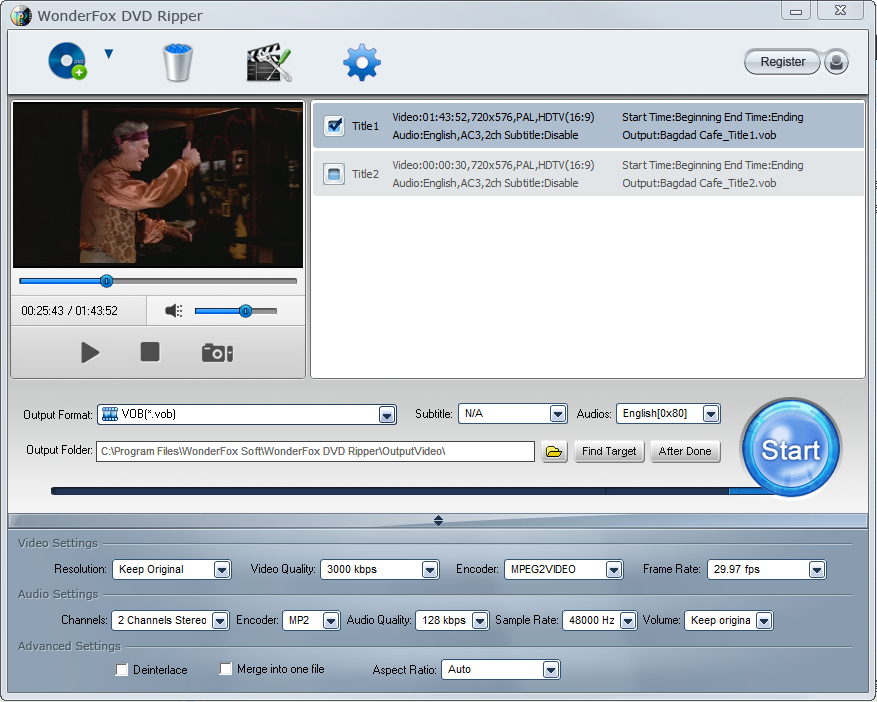
This is real No. 1 speed dvd ripping tool that provides the quick solution to Rip DVD to a wide range of mainstream video and audio formats such as DVD to AVI, DVD to MP4, DVD to MKV, DVD to MPG for quick back up DVD to iPad, DVD to iPhone 6 , DVD to Android, etc. And new media formats are keeping added and supported.
In supports of all regular DVDs including DVD Movie, TV Show, Tutorial(P90X/T25/...), etc. With the powerful dvd decryption technology, it can remove/bypass DVD CSS, Region Code, Multi-angle, RCE, Sony ARccOS, UOP and even Disney X-Project and even Cinavia Protection.
The better, WonderFox DVD Ripper is real No.1 fast DVD ripping tool that takes about only 20 minutes to rip a 150 minutes DVD to MP4, AVI, MKV, MOV, WMV with 0-Quality-Loss and much less time to MPG(only 5~10 minutes). Moreover, it adds optimized presets for all pop portable devices such as DVD to iPhone 5S, iPad Air, iPad mini 3, DVD to Samsung Galaxy S5, Sony, Nokia, BlackBerry, HTC, Xbox, Android device, etc.
For most users, this is zero-difficulty dvd ripper tool, only (Load DVD > Output Format > Get Start) three steps to complete the dvd ripping process. Blazing fast ripping speed but preserves high original quality.
Version 9.6 (Changelog):
1. [Important!] Because of security reasons, we have changed the registration system. If you have any issus on registration please contact support@videoconverterfactory.com. We will help you to solve problems within 24 hours.
2. A part of the function optimization.
Verdict:
A well-rounded DVD ripping package that enables you to enjoy your movie files on any of the devices you own.
Your Comments & Opinion
Quickly convert music and audio files from one format to another
Access your backed up data on your mobile device
Rip YouTube videos into MP3 format
Stream audio and video to your Android mobile without the need to convert it first
Stream video from your Mac or PC to iOS without the need for prior conversion
Rip DVDs to your Mac, iPhone or iPad
Copy and convert DVD content and your videos, then publish online, to YouTube, media devices and more
Automatically download entire web galleries in minutes with this time-saving internet tool
Breathe new life into your old scanner with this handy scanning tool
Breathe new life into your old scanner with this handy scanning tool
Breathe new life into your old scanner with this handy scanning tool
Breathe new life into your old scanner with this handy scanning tool