From Twitter

Please wait while my tweets load

If you can't wait - jump to Twitter

See more tweets...

RSS Feed

Please wait while my feed loads

See more posts...

Newsletter

Subscribe to either one of our two newsletters for regular updates and information

Downloads newsletter

This is a weekly newsletter with download news, updates and other information

This is a monthly newsletter with software store information, offers and deals

CinemaDrape 2.0.0.235

Quickly remove desktop distractions with this simple tool

by Mike Williams

Our Rating:
Your Rating:
Login to rate
Based on 0 ratings
License: Freeware
Operating Systems: Windows 7 (32 bit), Windows 7 (64 bit), Windows 8, Windows Vista (32 bit), Windows Vista (64 bit), Windows XP
Requirements:
Languages: English
Software Cost: Free
Date Updated: 18 December 2012
Watchlist: Add download to my watchlist
Downloads To Date: 74
Developer: Aurelify
RSS News Feed: http://www.aurelify.com/feed/
Twitter Feed: http://twitter.com/aurelify
Facebook: http://www.facebook.com/Aurelify
Buy the new TuneUp Utilities 2013 for only $16.95, with lifetime license, saving 58% from MSRP, only from store.downloadcrew.com
CinemaDrape 2.0.0.235
Quickly remove desktop distractions with this simple tool

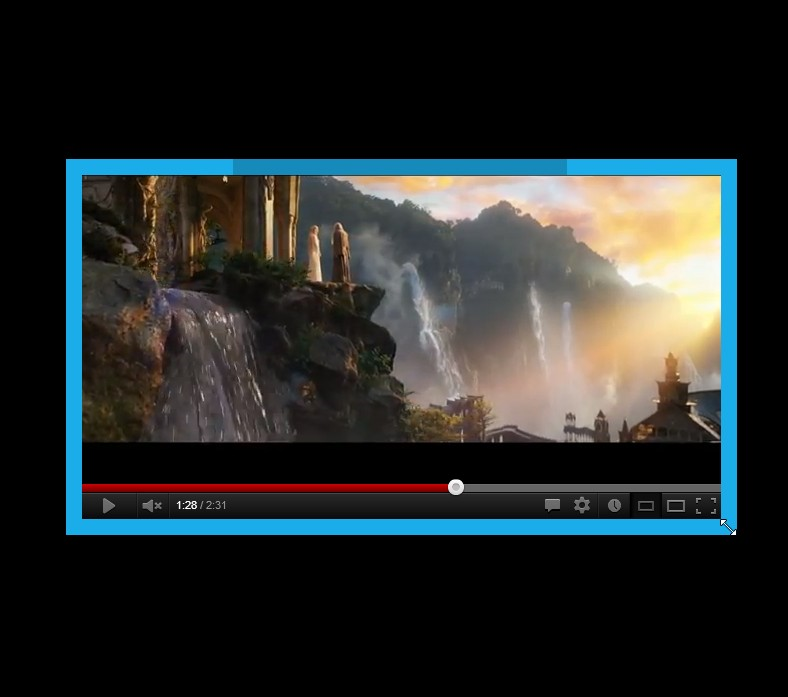
CinemaDrape is a tiny tool which can blank out everything but particular desktop windows, so you can focus on those with no distractions from desktop gadgets, taskbar notifications or anything else.

The program starts a little drastically, by blanking your entire desktop, everything but the CinemaDrape window. But you can then draw a rectangle (with mouse or a finger) in the approximate area which you'd like to view. Move your mouse cursor to the border of that rectangle, and you're able to resize it to suit your needs. Repeat the process elsewhere and you'll end up with a screen where you see only your areas of interest, and everything else is blanked out.

Having to draw a rectangle when you can't see anything is a little annoying, of course, but the program offers an alternative. If you just move the mouse cursor somewhere inside a window, then press Ctrl+W, then it'll automatically display that window for you.

If you lose track of where you are, you can always press Ctrl+F11 to toggle CinemaDrape off temporarily. Which means you can then move your mouse cursor over a particular window, and press Ctrll+F11 to toggle the program back on, then Ctrl+W to display that window.

And a right-click menu provides plenty of other functionality. So if, say, you don't like making the rest of your desktop entirely black, an Opacity tweak allows you to see a little something of what lies underneath, which could make the program easier to use while still minimising distractions.

Verdict:

It takes a little exploration to figure out how CinemaDrape is best used, but once you've mastered the basics the program proves an easy way to remove desktop distractions

Your Comments & Opinion
 
Related Download Articles
 
WinMaximumize 1.1

WinMaximumize 1.1

Freeware

Instantly expand a selected window to fill any available free space

DesktopNotifier

DeskNotifier for Android 1.1.0

Freeware

Receive notifications from your Android device on your desktop

Windows 8 Skin Pack

Windows 8 Skin Pack 9.0 (32-bit)

Freeware

Get the look of Windows 8 for free

Skin Pack Installer System

Skin Pack Installer System 3.0 (32-bit)

Freeware

Simplify the creation of Windows skin packs

Other Download Articles From This Category
BetterDesktopTool

BetterDesktopTool 1.6

Freeware

Bring Expose and Spaces style features to Windows

AutoHotKey's macro recorder

AutoHotkey 1.1.10.01

Open Source

Automate any task on your computer with this powerful scripting tool 

Disk Sorter 5.2.18

Disk Sorter 5.2.18 Free

Freeware

Find out exactly what's tying up all your hard drive space

FreeCommander XE

FreeCommander XE build 620

Freeware

Powerful, yet easy-to-use alternative to Windows Explorer

From Softwarecrew

Please wait while my feed loads

See more posts...


Spotlight: Free Full Software

Ashampoo Burning Studio 2013 (v11.0.6)

Free Full Commercial Software

Ashampoo Burning Studio 2013 is a compact, simple, but surprisingly feature-packed disc burning suite.

The program makes it easy to create simple data discs and audio CDs, for instance: just drag and drop your files onto the list area and you'll be burning the finished disc in a couple of clicks.

That's just the start, though. Burning Studio 2013 can also create data discs with customised, interactive multi-page menus, perfect if you'd like a more professional way to share and present the disc contents.

A built-in backup tool allows you to create backups which may be encrypted, compressed, and span several CDs, DVDs and Blu-rays.

And there are modules to create VCD or SVCD video projects; burn video DVDs or Blu-ray discs from prepared folders; create, browse or burn disc images (ISO, CUE/ BIN and Ashdisc formats are supported); copy discs, erase them, design and print disc covers, labels and booklets, and more.

The focus throughout is on ease of use, though, and so Ashampoo Burning Studio 2013 remains very straightforward, whatever you're doing. Most disc projects are created via the same simple interface, and for the most part all you have to do is drag and drop the necessary files. But experts will find more advanced options are only a click away, and if you need to then you can set ISO and UDF version, enable Joliet, make a disc bootable and more.

Note the download here will take you to the Downloadcrew Software Store where you can download Burning Studio 2013.

[...]
Value:
Free
Rating: