


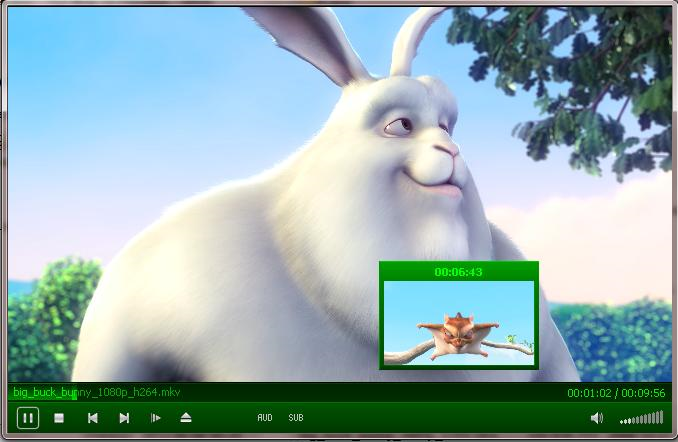
MPC-BE is an open source offshoot of the excellent MPC-HC media player, essentially very similar though with some interesting new touches.
The program looks and feels quite similar to VLC Media Player. You can open audio files or videos of just about any type, as well as playlists and DVDs, then play them back in a very familiar and configurable interface. (How configurable? The Options dialog allows you to set up custom hotkeys for more than 180 program actions, allowing you to make it work exactly as you'd like.)
MPC-BE understandably looks much like MPC-HC, but the YouTube-style video previewing works well. If you want to move to some other point in a video, there's no need to keep repeatedly clicking the seek bar, and wait to see where you are. Instead, just hover your mouse cursor over the bar, and MPC-HC will show you a frame from that point in the movie, even while it's playing some other section - a real time-saver. (As long as you've enabled the feature, anyway - click View > Options > Interface and check "Use the preview in the search", first.)
The player also provides more subtitles options and controls, along with a new Sub button to help you access them. A lengthy list of new decoders ensures it should play more audio and video files, as well as now opening image files. There are lots of smaller changes, fixes and extra configuration options, and it's all wrapped up in a mildly revamped interface.
MPC-BE isn't exactly a media playing revolution, then, but the video preview feature alone is enough to justify its existence, and we'll be interested to see where the project goes next.
Verdict:
While still much the same as MPC-HC, MPC-BE deserves applause for its neat video preview feature, and we'll be interested to see where the project goes next
Your Comments & Opinion
- it wants the latest ActiveX Runtime to be installed
- it doesn't save settings changes between sessions either with Apply or OK, including that Preview, which is a good feature
- my sense is the video is not quite as good as Zoom Player Pro, tho they are close
An all-powerful media player that while cope with almost any file format
RealNetworks’ media player finds its way to Android
Play music, video, DVDs and more with this versatile media player
Personal information management, media playing, image editing, Ubiquitous Player tries to be everything to everyone
Play just about any video or audio format using this versatile media player
Play just about any video or audio format using this versatile media player
Play CDs, DVDs and just about any audio or video file with this fast media player
Play music, video, DVDs and more with this versatile media player
A high-quality streaming music service for all your devices
Strip Exif data from your images and videos quickly and easily
Strip Exif data from your images and videos quickly and easily
Strip Exif data from your images and videos quickly and easily
Capture onscreen activity, edit it into a professional screencast, then share the results
Powerful graphic viewer and conversion tool