


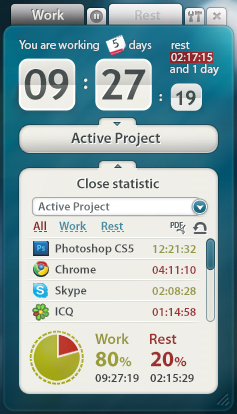
Motivate Clock is a free time manager for Windows.
The program can be very simple to use. Run it in "manual mode", click a button as you switch between work and non-work applications, and it records the basic work/ rest balance for any later reports.
Alternatively, create a "New Project", specify the applications you'll be using for work, and Motivate Clock automatically monitors the current window. When you're using Excel (for example) it adds time to the "Working" clock, switch to a game and it'll add to the "Resting" clock instead.
Run the program over time and a status display lets you see the time you've spent working and resting.
More detailed statistics on offer include the time spent using each individual application.
Verdict:
Motivate Clock isn't the most sophisticated of time trackers, but it's easy to use and you'll figure out the basics in just a few minutes.
Your Comments & Opinion
A simple and beautiful analogue clock for your Windows desktop
Manage, view, process and share your best digital images
A powerful to-do list manager that can be synchronised online
Take and edit screen grabs from just about any Windows application
Take and edit screen grabs from just about any Windows application
Completely uninstall unwanted programs in minutes
Automate any task on your computer with this powerful scripting tool
Quickly create industry-standard PDF files from any printable document