


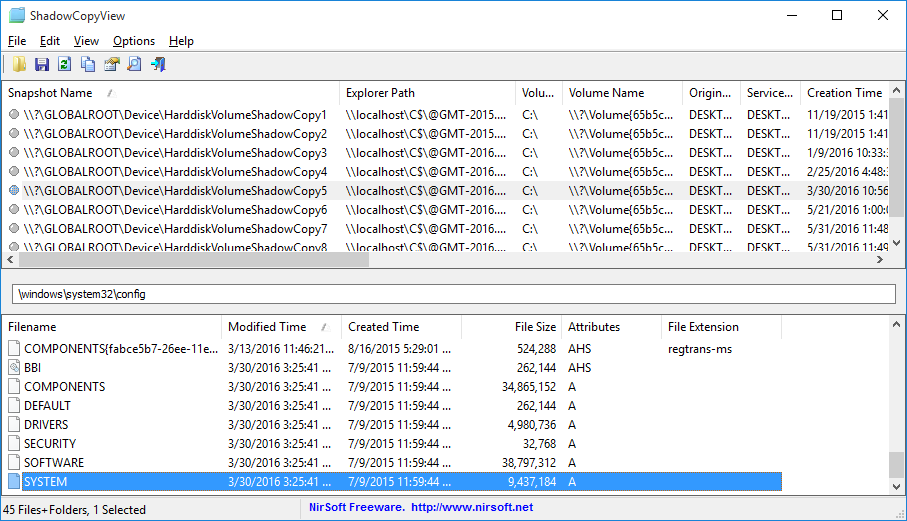
ShadowCopyView is a portable tool which lists the volume shadow copies on your PC (Windows Vista or later, and assuming the Volume Shadow Copy service is turned on).
These copies are snapshots of your hard drives which contain older versions of files and folders.
You're able to copy any of these files onto a folder on your hard drive, handy if you've accidentally deleted or changed the current version.
Windows allows you to do something similar with its "Previous Versions" feature, but ShadowCopyView may display more shadow copies, and it allows copying system files, even when User Account Control is turned on.
Please note, you must use the appropriate 32 or 64-bit version for your operating system (that is, the 32-bit build won't work on 64-bit Windows). You won't cause any harm if you get this wrong, it just won't work.
Version 1.03:
- Added toolbar icons for 'Directory Level Up', 'Go To Root Directory', and 'Copy Selected Files To'.
Verdict:
ShadowCopyView doesn't do very much, but if you just need a simple shadow copy browser then it's effective and easy to use.
Your Comments & Opinion
Recover deleted files from volume shadow copies
Recover deleted files from volume shadow copies
View shadow copies and copy their files
Quickly back up your entire hard drive with this simple Live CD-based tool
Restore accidentally deleted files with this powerful recovery tool
An all-in-one maintenance tool for your Mac
Take and edit screen grabs from just about any Windows application
Take and edit screen grabs from just about any Windows application
An advanced replacement for Windows Explorer
An advanced replacement for Windows Explorer
Monitor your PC's temperature, voltages, CPU frequency and more with this powerful stability checker