


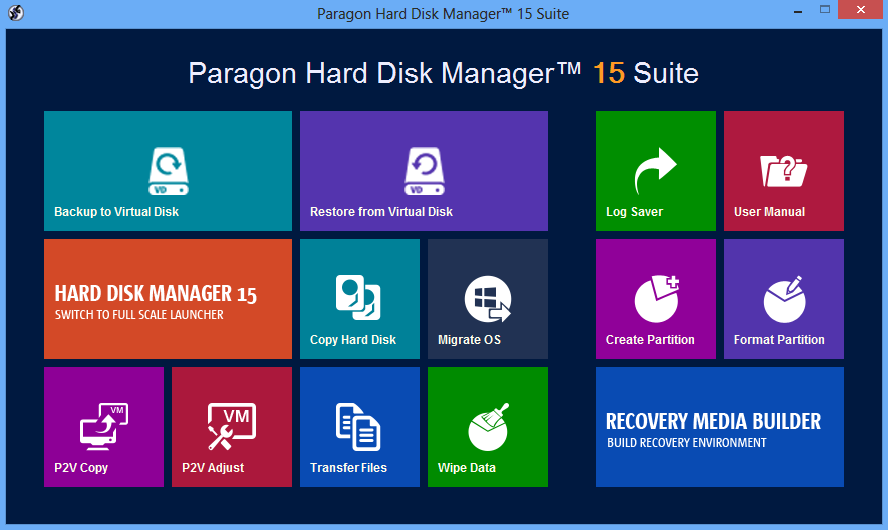
Paragon Hard Disk Manager 15 Suite is a powerful collection of tools which caters for all your hard drive needs.
Backup tools will help you back up anything from your emails or Documents folder, to individual partitions or any entire hard drive. Incremental and differential backups keep performance high, and your files can be saved to local or network drives, mounted or unmounted partitions, a secure backup capsule, even an FTP/sFTP server.
The program can create and format partitions on a new drive, then delete, undelete, hide or unhide them, split and merge them, or intelligently redistribute the free space from one partition to another. It's able to convert between file systems - even Apple's HFS - without formatting, and there's an option to convert from MBR to GPT in just a few clicks.
Maybe you want to migrate your existing installation onto a fast, new drive? Hard Disk Manager Suite can copy individual partitions or full hard drives. You're able to exclude any files you don't want transferred. And it doesn't matter if the new system is different to the older one. Hard Disk Manager will resize your partitions accordingly; it'll move 512-byte to 4KB sectors without problems, and the program can even make your system bootable again in a new hardware environment.
There are all kinds of extras. A Boot Manager helps you run multiple operating systems on one disk; the Boot Corrector fixes common problems which prevent your system from starting; partition alignment support helps deliver the best possible performance; you can migrate disks to all the main virtual formats (Microsoft, VMware, VirtualBox), or wipe disks entirely to make sure confidential data can never be recovered.
Additional features include the pVHD format, a special VHD file which comes optimised for backups. You can save partitions or entire disks - real or virtual - to pVHDs, then mount and restore them from Windows, WinPE or Linux.
There's full uEFI support, including the ability to create a bootable GPT/uEFI-compatible backup capsule for your 64-bit Windows installation, making it easy to repair any problems.
A simple Recovery Media Builder can build bootable WinPE or Linux-based recovery environments itself, with no need to install further Windows development tools (ADK, WAIK).
There's better compatibility everywhere, with new and enhanced support for Windows 8.1, Apple HFS+, Windows Storage Spaces, and all the latest virtualisation software (MS Virtual PC, VMware Workstation 10.0, VMware Fusion, and Oracle VirtualBox 4).
And this is all presented in a new interface. The "quick launcher" has a very "Windows 8" look; if that doesn't appeal, don't worry, the main program hasn't changed quite so much. Essentially it's replaced the menus with a new ribbon, but is otherwise fairly similar to before.
What you won't get here is support for dynamic volumes, beyond the ability to read them. If you need to back up, restore, wipe and generally work with dynamic disks then we'd recommend you try Suite's big brother, Paragon Hard Disk Manager 15 Professional. Other benefits of that version include strong support for working with virtual machines, scheduled copy tasks, Bitlocker support, and powerful low-level tweaks like the ability to change a partition's cluster size.
Please note, the trial version doesn't include Paragon's Recovery Media Builder, and some of its operations are available in virtual mode only. You also need to register to obtain your download and a trial serial code, so the trial link here points to the Paragon registration page.
What's new in v15?
- Embedded Recovery Media Builder 3.0
- File-level backup/restore for virtual containers (pVHD, VHD, VHDX, VMDK)
- Adaptable main program window
- Wiping SSD
Verdict:
Paragon Hard Disk Manager 15 Suite provides an array of reliable and effective drive management tools, almost all powered by helpful wizards so they're very easy to use. Some of the individual areas are weaker than others - its backup tools are quite basic - but if you'll use most of its functions then Paragon Hard Disk Manager 15 Suite is a sensible choice.
Your Comments & Opinion
Partitioning, defrag, backup, copy, clone, disaster recovery - Hard Disk Manager does it all
Partitioning, defrag, backup, copy, clone, disaster recovery - Hard Disk Manager does it all
Partitioning, defrag, backup, copy, clone, disaster recovery - Hard Disk Manager does it all
Monitor your PC's temperature, voltages, CPU frequency and more with this powerful stability checker
Free up valuable hard drive space with the capable cleanup tool
A versatile journaling and notebook tool to pop on your USB drive
A notepad/ to-do tool with cloud sync
Monitor file and folder changes on your hard drive in real time