From Twitter

Please wait while my tweets load

If you can't wait - jump to Twitter

See more tweets...

RSS Feeds

Receive a regular RSS feed from our latest, most popular and recommended downloads

Latest downloads feed

Get a regular RSS from our most latest downloads

Most popular downloads feed

Get a regular RSS from our most popular downloads

Recommended downloads feed

Get a regular RSS from our recommended downloads

Newsletter

Subscribe to either one of our two newsletters for regular updates and information

Downloads newsletter

This is a weekly newsletter with download news, updates and other information

This is a monthly newsletter with software store information, offers and deals

Notpod 1.4.1

Sync music from iTunes to any MP3 player or phone

by Nick Peers

Our Rating:
Your Rating:
Login to rate
Based on 0 ratings
License: Freeware
Operating Systems: Windows 2000, Windows 7 (32 bit), Windows 7 (64 bit), Windows Vista (32 bit), Windows Vista (64 bit), Windows XP
Requirements:

iTunes, portable device that appears as a removable drive in Windows 

Languages: English
Software Cost: Free
Date Updated: 06 January 2012
Watchlist: Add download to my watchlist
Downloads To Date: 535
Developer: Notpod
RSS News Feed:
Twitter Feed: http://www.twitter.com/notpodapp
Facebook: http://www.facebook.com/pages/Notpod/150529768361354
Buy TuneUp Utilities 2012 for only $18.99, with lifetime license, saving 62% from MSRP, only from store.downloadcrew.com
Notpod 1.4.1
Set up your device via Notpod then sync music to it effortlessly from iTunes.

There’s one major drawback to using iTunes: it ties your music collection to your computer or Apple’s iOS devices. Switch to another MP3 player or mobile device (such as Android) and suddenly keeping your music in sync between iTunes and your new player is a less pleasurable experience.

Oh sure, you can do it manually, but it’s a bind. Far better, then, to use a third-party tool to do the hard work for you. Notpod, previously known as iTunes Agent, is designed to work with any mobile device that appears as a removable drive in Windows.

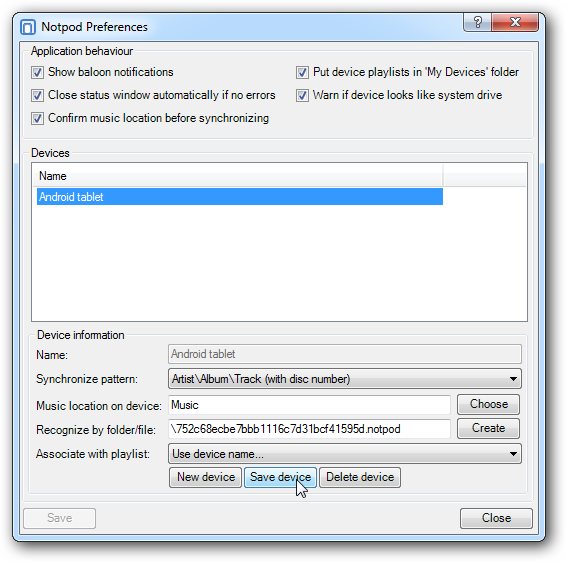
Once installed, it places an icon in the Notification area of the Taskbar – right-click this and choose Preferences to set up a connection to your mobile device, which needs to be connected when you set it up.

Give the connection a name, select your device’s music folder and its root directory (for Notpod’s benefit) and then pick a synchronization pattern. This basically means choose how you want your music organised and named on your mobile device. Once done, click Close and you’re ready to roll.

Now switch to iTunes and you’ll see Notpod has set up a folder (My Devices) under Playlists with your device name in it. Just drag your desired music to this playlist, then right-click the Notpod Notification area icon again, but this time choose Synchronize devices. Confirm the path is the correct one and click OK to sync music from iTunes to your device.

It's all straightforward from here on in – edit your playlist and re-sync with your device to update it. Notpod supports multiple devices too, perfect if you have a phone and a MP3 player you wish to keep in sync.

Warning: Notpod should not be used with a portable device that already has music stored on it – the program will delete any existing music from the folder before you begin unless it matches the names of tracks being synchronised.

Verdict:

The perfect tool for those who’ve switched from iOS to another device only to find iTunes won’t play ball.

Your Comments & Opinion
 
Related Download Articles
 
TuneSync

TuneSync Lite 2.27

Freeware

Wirelessly sync your iTunes library to your Android device 

TuneSync

TuneSync Server 2.0

Freeware

Wirelessly sync your iTunes library to your Android device 

iTuner - The iTunes Companion

iTuner - The iTunes Companion 1.4.4322

Freeware

Take control of iTunes from Windows’ system tray

Moodagent for iPhone

Moodagent for iPhone 1.0.1

Freeware

Create music playlists to suit your mood

Other Download Articles From This Category
Plex Media Center for Windows

Plex Media Center 0.9.5.3

Freeware

Access your Plex Media Server content from your PC or Mac 

Ubiquitous Player

Ubiquitous Player 5.1

Free, for personal-use only

Personal information management, media playing, image editing, Ubiquitous Player tries to be everything to everyone

Pixelmator

Pixelmator 2.0.4

Trial Software

A powerful image editor available for a fraction of the cost of the competition

EMDB 1.48

EMDB 1.48

Freeware

Keep track of even the largest movie collection with this powerful database

From Softwarecrew

Please wait while my feed loads

See more posts...


Spotlight: Free Full Software

Giveaway: WinISO Standard 6.1.0

Free Full Commercial Software

WinISO is a very comprehensive tool which provides everything you need to create, edit and convert disc images.

If you've an image file already, for instance (ISO, CUE/ BIN, NRG, MDF, CCD, IMG and DVD formats are supported) then you can open it in a click or two, browse the image contents, and extract the files you need with a quick drag and drop.

It's just as easy to create new ISO9660, UDF, even HFS+ images. Just choose the option you need, then either manually build up your preferred file and folder structure; drag and drop your files and folders from Explorer onto the program; or create an image directly from a CD, DVD or Blu-ray disc.

Of course you can edit images, too. Is an ISO file too large for your needs, say? Open it up, locate and remove any surplus files to free up a little space.

WinISO program has full support for reading and creating bootable image files. A simple conversion tool makes it easy to convert disc images into the format you need. And the program can even mount ISO files as Explorer files, or burn images to disc when you're ready to save them.

Please note, this trial version of WinISO Standard will not save files greater than 500MB in size.

Giveaway: on Wednesday, we're giving you the full current version of WinISO Standard 6 worth $29.95. The download link here will take you to Downloadcrew Giveaway.

[...]
Time Remaining: