From Twitter

Please wait while my tweets load

If you can't wait - jump to Twitter

See more tweets...

RSS Feed

Please wait while my feed loads

See more posts...

Newsletter

Subscribe to either one of our two newsletters for regular updates and information

Downloads newsletter

This is a weekly newsletter with download news, updates and other information

This is a monthly newsletter with software store information, offers and deals

Wuala "Weinegg" build 391

Easily back up, store, sync and share your files with this straightforward web service

by Mike Williams

Our Rating:
Your Rating:
Login to rate
Based on 0 ratings
License: Freeware
Operating Systems: Linux, Mac OS X, Windows 7 (32 bit), Windows 7 (64 bit), Windows Vista (32 bit), Windows Vista (64 bit), Windows XP
Requirements:


Languages: English, Chinese, Dutch, French, German, Italian, Polish, Portuguese (Brazil), Portuguese (Portugal), Russian, Spanish, Swedish
Software Cost: Free
Date Updated: 27 February 2012
Watchlist: Add download to my watchlist
Downloads To Date: 325
Developer: Caleido Inc
RSS News Feed: http://twitter.com/statuses/user_timeline/10615272.rss
Twitter Feed: http://www.twitter.com/Wuala
Buy TuneUp Utilities 2012 for only $18.99, with lifetime license, saving 62% from MSRP, only from store.downloadcrew.com
Wuala Weinegg
Back up, store and share your files

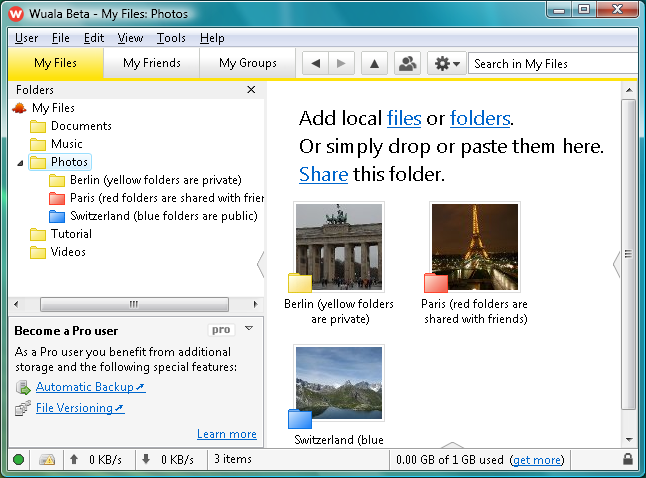
Wuala is a desktop and web service that allows users to securely back up, store, share and access their most important files.

At its simplest, you can use Wuala as a simple form of online backup. Just drag and drop a few digital photos onto the client, for instance, and it'll quickly upload them for you.

Make your Photos (or any other) folder shareable, though, and friends and family can then access your latest shots via their browser. Or you can even create "groups", essentially public folders where everyone can share files: photos, videos, music, whatever it might be.

Your Wuala files can be accessed from Windows, Mac or Linux-based client software. Or you can view them directly from any Java-enabled browser, including smartphones.

The latest version of the program now supports synchronisation between multiple computers - now you can keep folders synchronised on separate machines without having to worry about them being switched on and connected at the same time. Changes are uploaded to your backup space, and then downloaded to your other synced folders when they come online.

If there's a problem, it's your initial storage allocation, which starts off at a relatively miserly 1GB. You can increase that to 3GB by inviting friends to join the service, though, or add even more by trading spare space on your hard drive (assuming you've a fast broadband connection).

And if that's still not enough, then you can buy additional storage - it's actually a little uncompetitive the higher you go, but the 10GB service for €19 a year is perfect for those looking for a cloud-based sync option rather than full backup service.

The brand new "Weinegg" build brings these staggeringly amazing new features:

-various bug fixes
-minor improvements

Verdict:

Wuala is a great choice for those looking for an inexpensive online backup solution with additional features such as synchronisation between computers.

Your Comments & Opinion
 
Related Download Articles
 
Google Picasa 3.9.1

Google Picasa 3.9.1 (build 135.83)

Freeware

Make the most of your digital photos using Google's image editing and organisation tool

UpdateStar Online Backup

UpdateStar Online Backup 2.2.5

Trial Software

Keep your most important files safe from harm with this great value online backup service

SpiderOak's Windows client

SpiderOak 4.3.9917

Freeware

Enjoy online backup, syncing and sharing with 2GB free space from SpiderOak 

SpiderOak's Windows client

SpiderOak for iPhone/iPad 1.2

Freeware

Enjoy online backup, syncing and sharing with 2GB free space from SpiderOak 

Other Download Articles From This Category
SyncBackSE

SyncBackSE 6.1.0.5

Trial Software

Safeguard your precious data with this backup and synchronizing tool

Zero Assumption Recovery 9.1

Zero Assumption Recovery 9.1

Trial Software

Restore accidentally deleted files with this powerful recovery tool

FBackup 4.7

FBackup 4.7.270

Freeware

Backup your most important files & preferences using this free tool

GoodSync for Windows

GoodSync for Windows 9.1.9.1

Freeware

Keep files synchronised between drives, computers and servers

From Softwarecrew

Please wait while my feed loads

See more posts...

Our Price: $55.99
RRP: $79.99
Saving 30%
Buy Now More Info
 

Spotlight: Free Full Software

Giveaway: WinISO Standard 6.1.0

Free Full Commercial Software

WinISO is a very comprehensive tool which provides everything you need to create, edit and convert disc images.

If you've an image file already, for instance (ISO, CUE/ BIN, NRG, MDF, CCD, IMG and DVD formats are supported) then you can open it in a click or two, browse the image contents, and extract the files you need with a quick drag and drop.

It's just as easy to create new ISO9660, UDF, even HFS+ images. Just choose the option you need, then either manually build up your preferred file and folder structure; drag and drop your files and folders from Explorer onto the program; or create an image directly from a CD, DVD or Blu-ray disc.

Of course you can edit images, too. Is an ISO file too large for your needs, say? Open it up, locate and remove any surplus files to free up a little space.

WinISO program has full support for reading and creating bootable image files. A simple conversion tool makes it easy to convert disc images into the format you need. And the program can even mount ISO files as Explorer files, or burn images to disc when you're ready to save them.

Please note, this trial version of WinISO Standard will not save files greater than 500MB in size.

Giveaway: on Wednesday, we're giving you the full current version of WinISO Standard 6 worth $29.95. The download link here will take you to Downloadcrew Giveaway.

[...]
Time Remaining: