


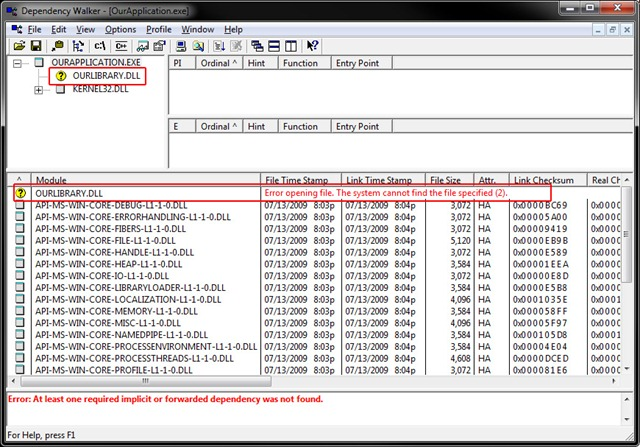
Microsoft's Dependency Walker is a simple tool that will display all the DLLs and similar support files required by an application, highlighting any that are missing, very useful if a program won't launch and you're not sure why.
If an application crashes when you try to run it, and there's no clear reason why, then open an Explorer window and browse to the app's folder. Drag and drop its executable file onto Dependency Walker, and in a few seconds you'll see a list of whatever DLLs it requires. Any missing files will be highlighted in red, and you can then Google them for more information.
If you're knowledgeable about Windows DLLs and their purposes then the list can also have a minor security purpose, as it gives you some idea of what a suspect program might do, without having to run it.
And Dependency Walker can also reveal system problems. We tried it on a test PC and discovered that "ieshims.dll" was reported as missing. And our copy of IE was very unstable - was this related? An internet search revealed the answer in seconds, we had a minor system configuration problem, it was quickly fixed and IE became much more reliable.
Verdict:
Dependency Walker provides a quick and easy way to figure out why some application launch problems
Your Comments & Opinion
A powerful and evolving tweaking and debloating tool for Windows 11
Synchronize your Outlook folders with folders in iCloud
Protect your personal privacy with this exceptionally thorough portable security tool
Find out everything you'll ever need to know about your PC with this comprehensive system information tool
The latest stable Chrome Portable includes a number of under-the-hood improvements
The latest stable Chrome Portable includes a number of under-the-hood improvements
Easily download, install, organise, update and generally manage your own collection of portable apps