


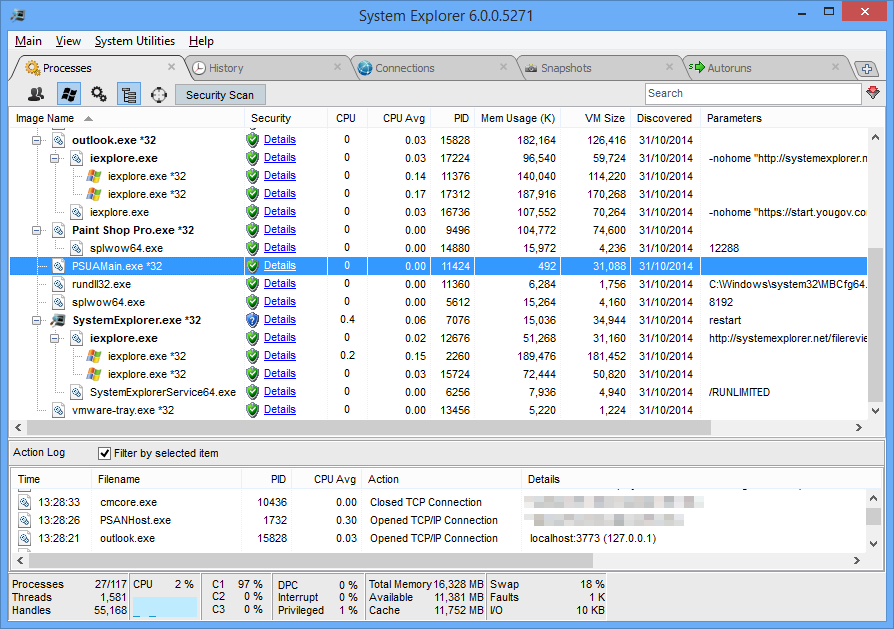
System Explorer is a powerful tool which tells you more about the programs running on your PC.
This starts with basic details, like process name, ID, CPU and RAM use. A Security icon highlights anything suspicious, and if you don't recognise a process then clicking "Details" opens a web page which may tell you more.
An "Action Log" pane displays key actions of the currently selected process, including any network connections opened and programs launched: perfect for hunting malware.
A Performance tab not only displays a graph of CPU, RAM and swap file use, but also highlights the most demanding processes.
The History tab displays a timeline of your recent PC activities, including processes launched and terminated, and network connections opened and closed.
There are other modules to display your startup programs, drivers, Windows services, uninstallers, network traffic, loaded modules and assorted other useful system information.
Most of these features go well beyond static lists. View your startup programs, say, and you can disable or delete any you don't need, search for them online, open their program folder or check their Registry key in REGEDIT.
A Snapshot tool can create snapshots of your system at any time - before or after the installation of a program, say - and display the differences between them.
Best of all, while this may sound overwhelming, smart interface design keeps any navigation hassles to a minimum. If you're only interested in the Snapshot and History tools, say, just set up the program to display those tabs only, and you need never see any of the other functions again.
Verdict:
System Explorer is easy to use and provides a host of computer maintenance and management tools. These don't have the depth of the more specialist competition, though. If you're an expert user who needs the maximum amount of detail about running processes, say, Process Explorer or Process Hacker will still be preferable.
Your Comments & Opinion
Quickly see the processes, tasks and applications are running on your computer
Positions folder and program windows on your screen to aid workflow
View and manage Windows startup programs
A comprehensive Task Manager replacement
Monitor applications and processes over a set period of time with this free tool
Take more control over the installation and removal of programs from your computer
A free tune-up utility to maintain the performance of Windows
Keep the contents of folders synchronised for backup purposes
Keep the contents of folders synchronised for backup purposes
Keep the contents of folders synchronised for backup purposes
Preserve your desktop icon layout with this handy backup tool