From Twitter

Please wait while my tweets load

If you can't wait - jump to Twitter

See more tweets...

RSS Feed

Please wait while my feed loads

See more posts...

Newsletter

Subscribe to either one of our two newsletters for regular updates and information

Downloads newsletter

This is a weekly newsletter with download news, updates and other information

This is a monthly newsletter with software store information, offers and deals

StickySorter 1.0.1908.0

Keep your jottings organised with this virtual sticky notes app 

by Nick Peers

Our Rating:
Your Rating:
Login to rate
Based on 0 ratings
License: Freeware
Operating Systems: Windows 7 (32 bit), Windows 7 (64 bit), Windows Vista (32 bit), Windows Vista (64 bit), Windows XP
Requirements:

XP requires .NET Framework 2.0 or 3.5 

Languages: English
Software Cost: Free
Date Updated: 08 June 2011
Watchlist: Add download to my watchlist
Downloads To Date: 329
Developer: Microsoft Office Labs
RSS News Feed: http://www.officelabs.com/_layouts/listfeed.aspx?List=3d0ec20d-058d-4333-813a-ebbcf0846655
Twitter Feed: http://twitter.com/#!/officelabs
Facebook: http://www.facebook.com/pages/Microsoft-Office-Labs/15494031177
Buy TuneUp Utilities 2012 for only $18.99, with lifetime license, saving 62% from MSRP, only from store.downloadcrew.com
StickySorter
Put your random thoughts in some semblance of order with StickySorter.

Ever found yourself drowning in a sea of sticky notes? Each one has something important scribbled on to it, but taken out of context it’s next to useless. What you need is a large wall you can pin your notes to, preferably organised into relevant groupings.

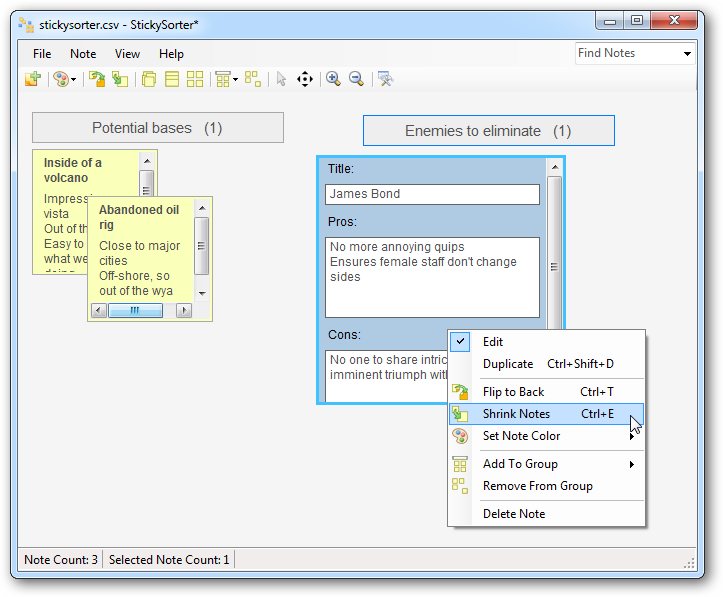
Not everyone wants to put aside a wall for stickies, which is where StickySorter comes in. It aims to emulate that wall by offering a sticky note app with a difference: not only can you create sticky notes, but you can organise them into groups using the program interface as your virtual wall.

It’s quite a simple tool: create your notes as and when you need to, then colour them accordingly before dragging them into various groups to keep them in order. Notes contain a single catch-all field for your text by default, but more fields can be added by choosing Notes > Customize.

Sadly, the tool lacks the finesse it needs to really grab the attention. It’s functional, but not attractive to work with. While there are some nifty features – the ability to select multiple notes (hold [Ctrl] as you click each one) and organise them into piles or stacks, for example – the unpolished nature of the app means it’s less friendly than it needs to be.

Take your notes: while you can zoom into and out of the wall, you only have two sizes to choose from as far as your notes are concerned: shrink or expand. Shrink is too small, with impractical scrollbars cluttering up what little space is available, and Expand often leaves lots of wasted space. Groups don’t work as intuitively as they could, and it all adds up to a program that’s sorely in need of some tweaks to transform it from an intellectual curio into something truly remarkable.

Verdict:

A promising idea, but the lack of polish makes it more frustrating than genuinely useful. 

Your Comments & Opinion
 
Related Download Articles
 
Evernote for Android

Evernote for Android 3.5

Freeware

Access Evernote on your Android to keep your life in order

Scrivener for Windows

Scrivener for Windows 1.0.1 FINAL

Trial Software

The writing tool designed with serious writing in mind comes to Windows

Tinderbox

Tinderbox 5.8.1

Trial Software

Store and share notes and ideas

Stick It

Stick It - Free Sticky Notes for iPhone v1.1

Freeware

Keep reminders on your iPhone with this free sticky notes app

Other Download Articles From This Category
CintaNotes

CintaNotes 1.6.2

Freeware

Put your thoughts and notes in order with this freebie organiser 

CodeTwo Sync for iCloud

CodeTwo Sync for iCloud 1.1.1.1

Freeware

Synchronize your Outlook folders with folders in iCloud

Task Coach

Task Coach 1.3.14

Freeware

Lightweight 'To Do' list manager, PIM and task organiser

doPDF 7.3

doPDF 7.3.381

Freeware

Produce a PDF document from just about any Windows application

From Softwarecrew

Please wait while my feed loads

See more posts...

Our Price: $14.95
RRP: $29.95
Saving 50%
Buy Now More Info
Offer Ends In:
 

Spotlight: Free Full Software

Giveaway: WinISO Standard 6.1.0

Free Full Commercial Software

WinISO is a very comprehensive tool which provides everything you need to create, edit and convert disc images.

If you've an image file already, for instance (ISO, CUE/ BIN, NRG, MDF, CCD, IMG and DVD formats are supported) then you can open it in a click or two, browse the image contents, and extract the files you need with a quick drag and drop.

It's just as easy to create new ISO9660, UDF, even HFS+ images. Just choose the option you need, then either manually build up your preferred file and folder structure; drag and drop your files and folders from Explorer onto the program; or create an image directly from a CD, DVD or Blu-ray disc.

Of course you can edit images, too. Is an ISO file too large for your needs, say? Open it up, locate and remove any surplus files to free up a little space.

WinISO program has full support for reading and creating bootable image files. A simple conversion tool makes it easy to convert disc images into the format you need. And the program can even mount ISO files as Explorer files, or burn images to disc when you're ready to save them.

Please note, this trial version of WinISO Standard will not save files greater than 500MB in size.

Giveaway: on Wednesday, we're giving you the full current version of WinISO Standard 6 worth $29.95. The download link here will take you to Downloadcrew Giveaway.

[...]
Time Remaining: