


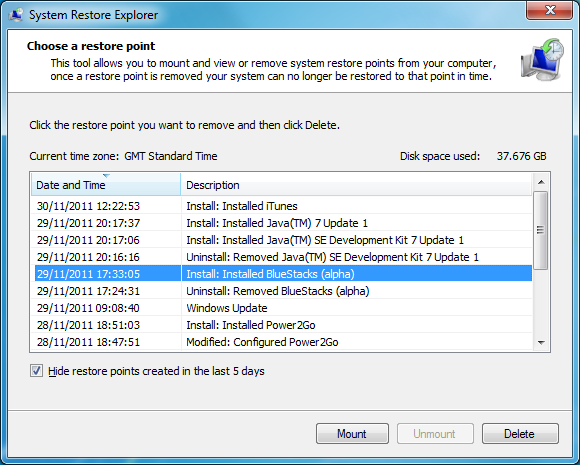
System Restore Explorer is, just as its name suggests, a program which will let you take a closer look at your system restore points.
Normally these kind of system-level backups aren't too accessible to most people. You can restore an entire system point, or maybe a shadow copy or two (right-click a folder, select Properties > Previous Versions), but that's about it.
Run System Restore Explorer, though, choose a restore point and click Mount, and it'll be displayed in an Explorer window. You can then browse its files and folders just like any other drive, open and view whatever documents you encounter, even drag and drop files from the restore point window into some other folder.
And once you've finished, clicking the Unmount button will remove the virtual drive. Or you can use the Delete button to wipe a particular restore point altogether (useful in itself as Windows normally only allows you to delete all but the last restore point).
Please note, System Restore Explorer is a beta and likely to contain bugs. We wouldn't recommend you use it for any system-critical purpose unless you have a complete system backup to hand.
Verdict:
System Restore Explorer provides a quick and easy way to access the contents of your previous system restore points.
Your Comments & Opinion
No need to haul your desktop, laptop, or notebook computer to a computer repair shop every time it needs service or repair only to wait a week or more to get it back. NetStf will come directly to your home or office and solve your computer problem right on the spot.
All work is guaranteed, so if we don't solve your computer problem, you don't pay. Simply call us to select an appointment time that fits your schedule. We offer same day, next day, after hours, and weekend service.
Please take a quick look at www.netstf.com so you can make an informed decision before employing the services of a computer repair technician.
Call us anytime; we are available to serve you 24 hours a day, 7 days a week.
561.921.1536
Best Computer Repair and Laptop Repair Services at Boca Raton FL, Boynton Beach FL, Delray Beach, West Palm Beach, Deerfield Beach and Lake Worth.
laptop repair boynton beach,boca raton computer repair,computer repair boca raton,computer repair boca raton fl,computer repair boynton beach,computer repair boynton beach fl,computer repair deerfield beach,computer repair delray beach,computer repair delray beach fl,computer repair lake worth fl,computer repair palm beach,computer repair palm beach gardens,computer repair west palm beach,deerfield beach computer repair,delray beach computer repair,laptop repair boca raton,laptop repair delray beach,palm beach computer repair,pc repair boca raton,boynton beach computer repair,computer repair royal palm beach,computer repair palm beach gardens fl,computer repair in west palm beach,computer repair west palm beach fl,west palm beach computer repair
Take control of your file and folder management with this powerful – if slightly unrefined - utility
Powerful dual-pane file manager with strong archive, FTP and macro support
Make web sites think that you’re using a browser other than Chrome
View and manage Windows startup programs
Copy files faster with this batch processing tool
Get more from Explorer with this powerful shell extension
Control your Windows 7 System Restore options from one easy-to-use portable program
Manage your files and folders with this dual pane tabbed Explorer replacement
Find out more - much more - about your PC with this benchmarking, diagnostic and system information tool
Host a virtual operating system
Host a virtual operating system
Host a virtual operating system