From Twitter

Please wait while my tweets load

If you can't wait - jump to Twitter

See more tweets...

RSS Feeds

Receive a regular RSS feed from our latest, most popular and recommended downloads

Latest downloads feed

Get a regular RSS from our most latest downloads

Most popular downloads feed

Get a regular RSS from our most popular downloads

Recommended downloads feed

Get a regular RSS from our recommended downloads

Newsletter

Subscribe to either one of our two newsletters for regular updates and information

Downloads newsletter

This is a weekly newsletter with download news, updates and other information

This is a monthly newsletter with software store information, offers and deals

JetBoost 1.1

Give your PC a small speed boost by closing unnecessary processes

by Mike Williams

Our Rating:
Your Rating:
Login to rate
Based on 0 ratings
License: Freeware
Operating Systems: Windows 2000, Windows 7 (32 bit), Windows 7 (64 bit), Windows Vista (32 bit), Windows Vista (64 bit), Windows XP
Requirements:


Languages: English, Bulgarian, Catalan, Chinese (Simplified), Hungarian, Italian, Polish, Portuguese (Brazil), Russian, Spanish
Software Cost: Free
Date Updated: 17 April 2012
Watchlist: Add download to my watchlist
Downloads To Date: 2484
Developer: BlueSprig, Inc.
RSS News Feed:
Twitter Feed: http://twitter.com/bluespriginc
Buy TuneUp Utilities 2012 for only $18.99, with lifetime license, saving 62% from MSRP, only from store.downloadcrew.com
JetBoost 1.1
Give your PC a small speed boost by closing unnecessary processes

JetBoost is a simple, free PC speedup tool which can close down unnecessary Windows processes at a click, so saving RAM and other valuable system resources, and optimising your overall system performance.

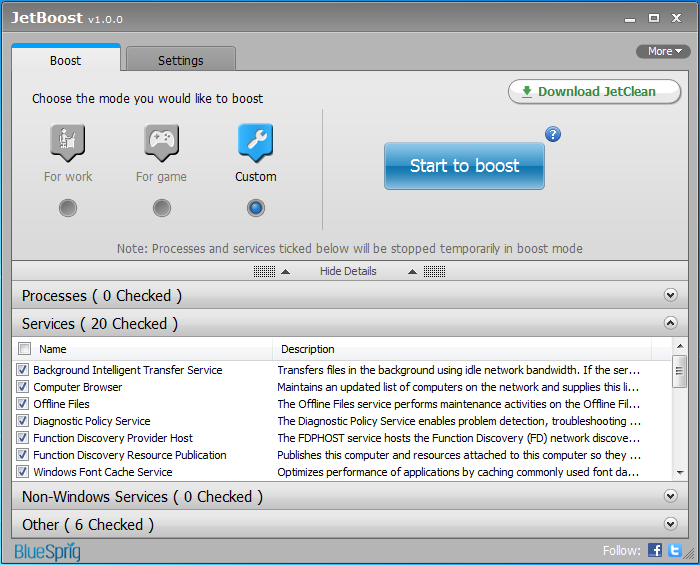
At a minimum, all you have to do is choose whether you'd like to optimise your speed for work, or gaming, before clicking the "Start to boost" button. And that's it: JetBoost will take care of everything else itself, closing down surplus Windows services, emptying the clipboard, changing your power plan to "High Performance" and applying assorted other tricks to enhance your system speed. Launch the game (or whatever) to take advantage of this extra performance, and when you're done, click the JetBoost "Stop" button to restore your previous services and settings and carry on where you left off.

If you'd like to take more control of exactly what JetBoost does, though, choosing the Custom option will enable you to define precisely how the program should work. You can protect some services, pause others, turn off particular processes, even close Explorer.exe (if you can do without it) to free up the maximum amount of RAM. You need to be careful here - turn off something important and there's no telling what might happen - but if you know what you're doing then Custom mode will allow you to recover more system resources.

Will JetBoost make a huge amount of difference? Probably not, with the default settings at least; our test PC gained around an extra 50MB of RAM, for instance. You may see better results with your system, though; specifying particular background processes to close will also help a lot; and if you normally don't run Windows using the High Performance power plan then that will also make a real difference.

Put it all together and there are small but probably worthwhile benefits to be had here, then, and it's definitely worth trying JetBoost to see what it can do for you.

Verdict:

JetBoost delivers small but worthwhile performance benefits even with its default settings, and by tuning the program further you may be able to see significant speed gains.

Your Comments & Opinion
 
Related Download Articles
 
Auslogics BoostSpeed 5.3.0.0

Auslogics BoostSpeed 5.3.0.0

Trial Software

Clean, optimise, tune and tweak your PC to deliver its best possible performance

Game Fire Personal

Game Fire Personal 2.1.111

Freeware

Optimise your PC for the best gaming performance. Maybe.

Glary Utilities

Glary Utilities 2.45.0

Free, for personal-use only

Comprehensive suite of PC speedup, maintenance and management tools

Glary Utilities Portable

Glary Utilities Portable 2.45.0

Free, for personal-use only

Comprehensive suite of PC speedup, maintenance and management tools

IObit Game Booster

IObit Game Booster 3.4

Freeware

Temporarily shut down unnecessary programs to free up RAM for resource-hungry games

SpeedUpMyPC 2012

Uniblue SpeedUpMyPC 2012 v5.2.1.3

Function Limited Demo

Automatically optimise, tweak and enhance your PCs performance in just a few clicks

WinUtilities Free

WinUtilities Free 10.52

Free, for personal-use only

Clean up your PC and improve its performance with this one-stop maintenance suite

iolo System Mechanic Free 10.8.1

iolo System Mechanic Free 10.8.5

Freeware

Optimise, clean and repair your PC

Other Download Articles From This Category
SUMo

SUMo 3.1.0.154

Freeware

Quickly discover which of your favourite programs have updates available

Toolwiz FlipBook 1.4.0.0

Toolwiz FlipBook 1.4.0.0

Freeware

Easily turn any text file into a stand-alone 3D ebook

Auslogics Disk Defrag 3.4.3.0

Auslogics Disk Defrag 3.4.3.0

Free, for personal-use only

Keep your hard drive in top condition with this powerful disk defragmentation tool

Auslogics BoostSpeed 5.3.0.0

Auslogics BoostSpeed 5.3.0.0

Trial Software

Clean, optimise, tune and tweak your PC to deliver its best possible performance

From Softwarecrew

Please wait while my feed loads

See more posts...

Our Price: $14.95
RRP: $49.95
Saving 70%
Buy Now More Info
Offer Ends In:
 

Spotlight: Free Full Software

Giveaway: WinISO Standard 6.1.0

Free Full Commercial Software

WinISO is a very comprehensive tool which provides everything you need to create, edit and convert disc images.

If you've an image file already, for instance (ISO, CUE/ BIN, NRG, MDF, CCD, IMG and DVD formats are supported) then you can open it in a click or two, browse the image contents, and extract the files you need with a quick drag and drop.

It's just as easy to create new ISO9660, UDF, even HFS+ images. Just choose the option you need, then either manually build up your preferred file and folder structure; drag and drop your files and folders from Explorer onto the program; or create an image directly from a CD, DVD or Blu-ray disc.

Of course you can edit images, too. Is an ISO file too large for your needs, say? Open it up, locate and remove any surplus files to free up a little space.

WinISO program has full support for reading and creating bootable image files. A simple conversion tool makes it easy to convert disc images into the format you need. And the program can even mount ISO files as Explorer files, or burn images to disc when you're ready to save them.

Please note, this trial version of WinISO Standard will not save files greater than 500MB in size.

Giveaway: on Wednesday, we're giving you the full current version of WinISO Standard 6 worth $29.95. The download link here will take you to Downloadcrew Giveaway.

[...]
Time Remaining: