From Twitter

Please wait while my tweets load

If you can't wait - jump to Twitter

See more tweets...

RSS Feed

Please wait while my feed loads

See more posts...

Newsletter

Subscribe to either one of our two newsletters for regular updates and information

Downloads newsletter

This is a weekly newsletter with download news, updates and other information

This is a monthly newsletter with software store information, offers and deals

F.lux

Automatically adjust your monitor settings to reduce eye strain

by Mike Williams

Our Rating:
Your Rating:
Login to rate
Based on 0 ratings
License: Freeware
Operating Systems: Windows 7 (32 bit), Windows 7 (64 bit), Windows Vista (32 bit), Windows Vista (64 bit), Windows XP
Requirements:
Languages: English
Software Cost: Free
Date Updated: 20 December 2012
Watchlist: Add download to my watchlist
Downloads To Date: 632
Developer: Stereopsis
RSS News Feed: https://api.twitter.com/1/statuses/user_timeline.rss?screen_name=justgetflux
Twitter Feed: http://twitter.com/justgetflux
Buy the new TuneUp Utilities 2013 for only $16.95, with lifetime license, saving 58% from MSRP, only from store.downloadcrew.com
F.lux
Automatically adjust your monitor settings to reduce eye strain

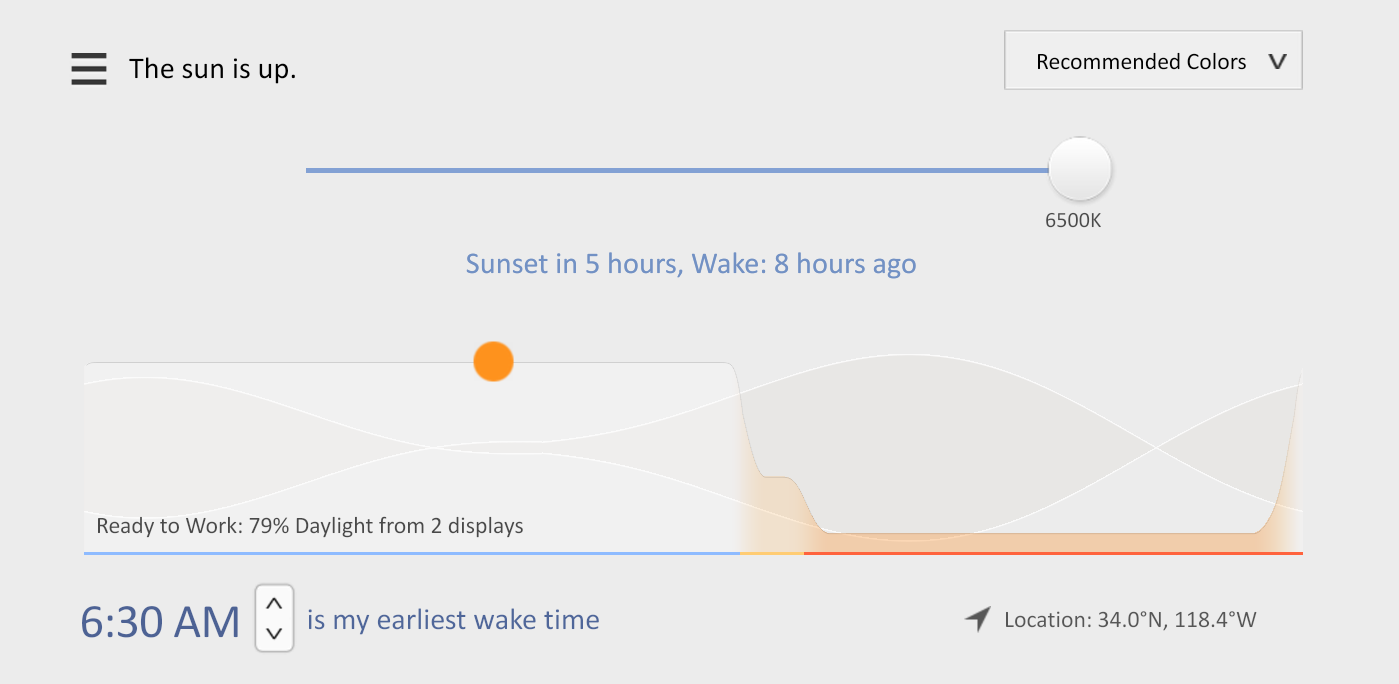
F.lux is an unusual tool which can automatically adjust your monitor's colour temperature to try and reduce eye strain.

Why bother? The theory is that computer displays are normally set up to display a harsh, blue light. This works fine during the day, but is too bright for night viewing, and could even promote sleep problems.

To avoid all this, F.lux uses your location, the date and time of day to figure out your sunrise and sunset times, then automatically adjusts your monitor's colour temperature to a more appropriate level.

To see what this might mean, click the blob representing the sun in the program's Settings dialog for a quick preview; it'll be at normal brightness levels during the day, but change to warmer, more orange/ yellow glow at night.

Click "Change Settings" and you can further customise the program to better suit your needs, by more accurately setting your location and deciding how quickly you want the colour temperature change to occur (it's annoyingly fast by default, but setting to "Slow" here will help).

And you can also adjust the colour temperature you'd prefer at day and night, but unless you're extremely sure what you're doing we'd recommend you try out the defaults for a while, first. The preview will show you what looks like a very extreme change, but in part that's because you're viewing it quickly, and all at a single time of day: it works much better in real life use.

F.lux won't be right for everyone. If you work both day and night at the same computer, though, in the same place, then it could be an effective tool. And the program includes no adware or other complications, so you can install and try it out without any hassles or problems.

Verdict:

It won't work for everyone, but in some cases F.lux really can make your monitor more comfortable to view

Your Comments & Opinion
 
Related Download Articles
 
UltraMon 3

UltraMon 3.2.2 (64-bit)

Trial Software

Make the most of your multi-monitor setup with this handy utility

iDisplay

iDisplay 2.3.6

Freeware

Use your iOS or Android device as a secondary display

iDisplay

iDisplay 2.1.1.6

Freeware

Use your iOS or Android device as a secondary display

iDisplay

iDisplay 2.1.39

Freeware

Use your iOS or Android device as a secondary display

Other Download Articles From This Category
ConsoleHoster 3.8

ConsoleHoster 3.8

Open Source

Run multiple command line windows from a single tabbed interface

USB Drive Letter Manager

USB Drive Letter Manager 4.7.3.0

Free, for personal-use only

Take control over the drive letters assigned to your USB devices

USB Drive Letter Manager 4.7 (64-bit)

USB Drive Letter Manager 4.7.3.0 (64-bit)

Free, for personal-use only

Take control over the drive letters assigned to your USB devices

John's Background Switcher 4.7

John's Background Switcher 4.7.0.22

Freeware

Locate great new desktop backgrounds, and switch them automatically with this powerful free utility

From Softwarecrew

Please wait while my feed loads

See more posts...

Our Price: $16.95
RRP: $49.95
Saving 66%
Buy Now More Info
Offer Ends In:
 

Spotlight: Free Full Software

Ashampoo Burning Studio 2013 (v11.0.6)

Free Full Commercial Software

Ashampoo Burning Studio 2013 is a compact, simple, but surprisingly feature-packed disc burning suite.

The program makes it easy to create simple data discs and audio CDs, for instance: just drag and drop your files onto the list area and you'll be burning the finished disc in a couple of clicks.

That's just the start, though. Burning Studio 2013 can also create data discs with customised, interactive multi-page menus, perfect if you'd like a more professional way to share and present the disc contents.

A built-in backup tool allows you to create backups which may be encrypted, compressed, and span several CDs, DVDs and Blu-rays.

And there are modules to create VCD or SVCD video projects; burn video DVDs or Blu-ray discs from prepared folders; create, browse or burn disc images (ISO, CUE/ BIN and Ashdisc formats are supported); copy discs, erase them, design and print disc covers, labels and booklets, and more.

The focus throughout is on ease of use, though, and so Ashampoo Burning Studio 2013 remains very straightforward, whatever you're doing. Most disc projects are created via the same simple interface, and for the most part all you have to do is drag and drop the necessary files. But experts will find more advanced options are only a click away, and if you need to then you can set ISO and UDF version, enable Joliet, make a disc bootable and more.

Note the download here will take you to the Downloadcrew Software Store where you can download Burning Studio 2013.

[...]
Value:
Free
Rating: