From Twitter

Please wait while my tweets load

If you can't wait - jump to Twitter

See more tweets...

RSS Feeds

Receive a regular RSS feed from our latest, most popular and recommended downloads

Latest downloads feed

Get a regular RSS from our most latest downloads

Most popular downloads feed

Get a regular RSS from our most popular downloads

Recommended downloads feed

Get a regular RSS from our recommended downloads

Newsletter

Subscribe to either one of our two newsletters for regular updates and information

Downloads newsletter

This is a weekly newsletter with download news, updates and other information

This is a monthly newsletter with software store information, offers and deals

XBMC 12.2

Looking for a replacement media center? Your search ends here.

by Nick Peers

Our Rating:
Your Rating:
Login to rate
Based on 0 ratings
License: Open Source
Operating Systems: Android, Linux, Mac OS X, Windows 7 (32 bit), Windows 7 (64 bit), Windows 8, Windows Server, Windows Vista (32 bit), Windows Vista (64 bit), Windows XP
Requirements:
Languages: English
Software Cost: Free
Date Updated: 03 May 2013
Watchlist: Add download to my watchlist
Downloads To Date: 1700
Developer: Team XBMC
RSS News Feed:
Twitter Feed: https://twitter.com/XBMC
Facebook: http://www.facebook.com/XBMC
Buy the new TuneUp Utilities 2013 for only $16.95, with lifetime license, saving 58% from MSRP, only from store.downloadcrew.com
XBMC 12.2
XBMC takes the humble media center to new levels of excellence.

The days of Windows and OS X coming fully furnished with a built-in media center are long gone – now you have to pay extra for the privilege in Windows 8, while Front Row is a distant memory for Mac users. But while the giants at Microsoft and Apple have turned their back on providing a decent one-stop shop for watching, organising and sharing media, third parties continue to develop some cracking alternatives.

One of the best has to be XBMC. This open-source marvel has come a long way since its early days, and has plenty to recommend it. As a humble media player it supports all the common formats natively, so you can be sure that it’ll play back whatever you throw at it.

It’s got a built-in DLNA media server, so you can use it to stream your media to other mobiles and devices on your network, and supports a vast array of plug-ins that add extra capabilities, such as accessing streaming catch-up TV services over the internet.

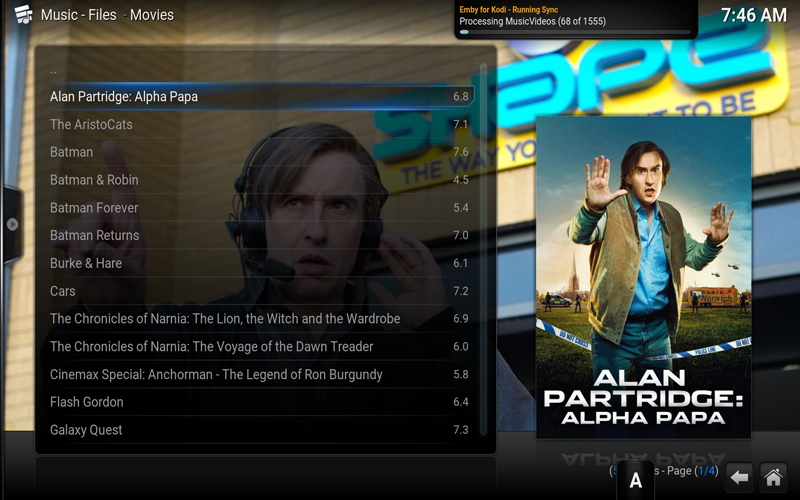
When you first launch the app, you’ll immediately see that it’s designed to work on lower-resolution screens such as older TVs, a nod to the fact media center software is often built with the thought of having your computer hooked up to your front room television for convenient access to all your media. The default skin is a little basic, but you can download alternative skins that provide a more modern look.

You’ll also find XBMC media management tools are impressive too – not only is it capable of playing most media formats, if you name up your media files correctly, it’ll automatically download and display useful information such as the episode title and synopsis of a TV show, or the correct artist name and track for music, making your collection easier to browse.

There is a slight learning curve involved with using XBMC, but it won’t take you long to master the basics and get it configured to your liking.

New/improved features in version 12.2 include:

- Fixed infinite loop on addon dependencies, resolves crashing problem that arrose immediately post 12.1 launch
- Numerous UPnP fixes
- Memory leak fixed when XBMC is minimized
- Various Raspberry Pi playback fixes and software codec support
- Fixed OSX audio mixing
- Fixed some audio-related crashes in Linux builds
- AirPlay fixes
- Bluray folder resume-bookmarks now work
- Ability to scan for new content on file folders has been reimplemented
- Language updates from Transifex

Verdict:

A visually stunning and effective media center tool that’s let down only slightly by a lack of hand-holding at key points.

Your Comments & Opinion
 
Related Download Articles
 
OpenELEC 3.0.0

OpenELEC 3.0.0

Open Source

Turn your ageing or second PC into a dedicated media center

Plex Media Center for Windows

Plex for Windows 8

No Trial Available. Purchase Only

Access your Plex Media Server from your Windows 8 or RT device.

Plex Media Center for Windows

Plex Media Center 0.9.5.4

Freeware

Access your Plex Media Server content from your PC or Mac 

Plex on Android

Plex 2.3.1

No Trial Available. Purchase Only

Access the content stored on your Plex media server direct from your iPhone, iPad or Android device.

Other Download Articles From This Category
Sublight

Sublight 4.0.4887

Freeware

Find and locate subtitles for your movie files quickly and easily 

K-Lite Codec Pack Update 9.9.4

K-Lite Codec Pack 9.9.4 Update

Freeware

Update K-Lite Codec Pack (any version) to the latest build

Your Tube for Windows 8

Your Tube for Windows 8 v1.0.0.6

Freeware

Browse through the world's largest video collection in Windows 8

TIFF to PDF 1.0

TIFF to PDF 1.0

Freeware

Easily convert multi-page TIFF images to PDF

From Softwarecrew

Please wait while my feed loads

See more posts...


Spotlight: Free Full Software

Ashampoo Burning Studio 2013 (v11.0.6)

Free Full Commercial Software

Ashampoo Burning Studio 2013 is a compact, simple, but surprisingly feature-packed disc burning suite.

The program makes it easy to create simple data discs and audio CDs, for instance: just drag and drop your files onto the list area and you'll be burning the finished disc in a couple of clicks.

That's just the start, though. Burning Studio 2013 can also create data discs with customised, interactive multi-page menus, perfect if you'd like a more professional way to share and present the disc contents.

A built-in backup tool allows you to create backups which may be encrypted, compressed, and span several CDs, DVDs and Blu-rays.

And there are modules to create VCD or SVCD video projects; burn video DVDs or Blu-ray discs from prepared folders; create, browse or burn disc images (ISO, CUE/ BIN and Ashdisc formats are supported); copy discs, erase them, design and print disc covers, labels and booklets, and more.

The focus throughout is on ease of use, though, and so Ashampoo Burning Studio 2013 remains very straightforward, whatever you're doing. Most disc projects are created via the same simple interface, and for the most part all you have to do is drag and drop the necessary files. But experts will find more advanced options are only a click away, and if you need to then you can set ISO and UDF version, enable Joliet, make a disc bootable and more.

Note the download here will take you to the Downloadcrew Software Store where you can download Burning Studio 2013.

[...]
Value:
Free
Rating: