


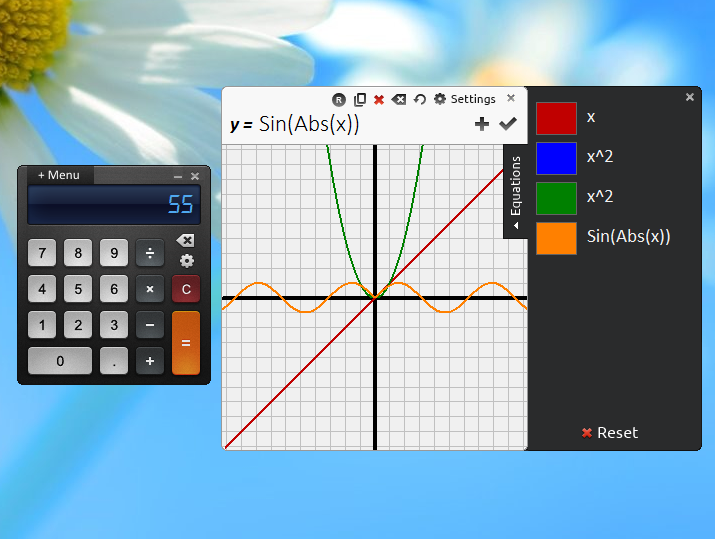
Reor is a free calculator with a surprising amount of features and functionality.
The program opens with the most basic of interfaces: numbers, four operators, "=", "C" - even the most math-challenged will feel at home immediately.
Tap the menu, though, and a vast number of other modes appears on a full-screen display. In a click you can view Scientific, statistical or financial functions, a graphical plotter, lists of physical and mathematical constants, a mortgage payment calculator, unit converter and more.
Unlike many other calculators, the core interface doesn't rework itself to suit the new mode. Switching to Scientific mode, say, just gets you a separate dialog with buttons like "cos", "sin" and "tan" which you select as required.
There are also some unexpected extras. A "wordify" function presents your currently-displayed value as words, for example, while a full History view gives you access to all the calculations you've performed so far.
Verdict:
Reor's interface is occasionally annoying. Does the main menu really have to display full-screen, on top of every other application? But it's a capable calculator, worth a look if you've outgrown Windows' own offering.
Your Comments & Opinion
Personal information management, media playing, image editing, Ubiquitous Player tries to be everything to everyone
A scientific calculator meets a spreadsheet - and this is the result
A powerful calculator for scientists and engineers
A high precision scientific calculator
Graphing calculator that students can use in science, mathematics, and many other subjects
Graphing calculator that students can use in science, mathematics, and many other subjects
A notepad/ to-do tool with cloud sync
Run software in an isolated environment to prevent it from making changes to your system
Are your drivers up-to-date? Here's how to find out
More powerful replacement for Windows' built in program removal tool
Monitor your PC's temperature, voltages, CPU frequency and more with this powerful stability checker