


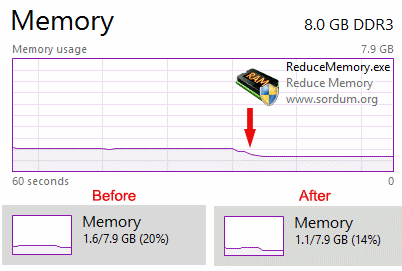
Reduce Memory is a portable tool which tries to free up some of your PC's RAM.
The program is very simple. There's no interface, no extra system tray icon, no need to select processes or choose optimisation methods: just run it and Reduce Memory cycles through all your applications, using a standard Windows function to reduce the memory requirements for each one.
Does this work? Well: in a way. We launched Task Manager on a test PC, clicked the Performance tab, and found our system had 3GB RAM "in use". After running Reduce Memory, it dropped to 2.2GB.
Sounds good, but there's a problem. Your applications may not have been using this 0.8GB of RAM right now, but if you continue using them, it's likely RAM consumption will rise again. We left Task Manager running, and the "in use" figure was 2.6GB within a minute or two, around 2.9GB after we got back to work.
Verdict:
Reduce Memory probably won't make any noticeable difference to your PC, and if it makes your applications swap RAM out, then back again as required, it could even slow you down.
It's possible you'll see different results, though, and the program is better than a lot of the competition: tiny, portable, adware-free, easy-to-use, and it doesn't waste resources itself by adding yet another startup/ system tray app. If you're interested, take a look, but don't expect too much.
Your Comments & Opinion
Identify your RAM type, manufacturer, speed, memory timings and more
Clean up memory automatically and/ or on demand
Improve Window's cache file and memory management to enhance performance
A configurable system monitor
A configurable system monitor
Build, split, merge and digitally sign your PDF files
A notepad/ to-do tool with cloud sync
Analyze, search, back up, clean up, and generally get more from your hard drive with this suite of tools