


If a Windows program doesn't have the rights to access a system file, Registry key, or carry out some other task, running it as an administrator might solve the problem - but this won't always be the case.
RunAsTrustedInstaller runs programs with the same privileges as the even more powerful TrustedInstaller, and could make all the difference.
Double-clicking RunAsTI.exe (32-bit) or RunAsTI64.exe (64-bit) opens a command window with TrustedInstaller rights, and any application you launch inherits the same privileges. Run REGEDIT, for instance, and you may be able to access areas you couldn't reach before.
Alternatively, pass either file a program name (RunAsTi64 regedit) in a script or shortcut and it'll launch an elevated version directly.
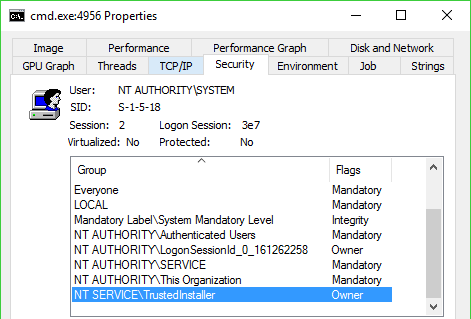
To check this for yourself, run a copy of Process Explorer, double-click on the extra-privileged program and choose the Security tab. The account list should include NT SERVICE\TrustedInstaller as an Owner.
Please note, some antivirus engines may flag RunAsTrustedInstaller as malicious, but that's only because it could theoretically also be used by malware to gain extra security rights. The program isn't dangerous itself.
Verdict:
RunAsTrustedInstaller offers a simple way to gain some extra PC security privileges, but don't use it unless you're completely clear what you're doing. There's usually a reason why files or Registry keys are locked and inaccesible, and if you change some key system component then you might have problems.
Your Comments & Opinion
Protect your computer by running in a virtual environment
Ramp up your PC's performance with this very configurable defrag tool
A very, very, very fast way to find the files and folders hogging your hard drive space
Tidy up your system after using the avast! uninstaller
Are your drivers up-to-date? Here's how to find out
Easily run programs as another user