


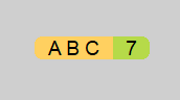
7 Caps is a free program which displays the status of the CapsLock and NumLock keys on a tiny always-on-top panel.
Initially this can be hard to see, especially if both keys are off. Hit CapsLock repeatedly and you'll see an "ABC" caption toggle on and off. Repeat with NumLock to see a "7" appear and disappear.
The panel floats above application windows, but you can drag it anywhere that seems convenient, and it'll restore to that position when it starts next time.
Beware: 7 Caps didn't stay on top of the taskbar on our Windows 10 system, and if we clicked somewhere else the panel could disappear behind the taskbar, making it inaccessible. Alt+Tabbing to 7 Caps brought it to the foreground again.
Right-clicking the panel displays a few settings. You can set the panel colours and opacity, have it start with Windows or not, and close 7 Caps down if necessary.
Verdict:
A handy accessory for anyone with a missing or broken NumLock/ CapsLock indicator.
Your Comments & Opinion
System tray icons display your Num Lock status, Caps Lock, hard drive activity, more
Automatically unlock your Caps Lock key
A notepad/ to-do tool with cloud sync
Run software in an isolated environment to prevent it from making changes to your system
Are your drivers up-to-date? Here's how to find out
More powerful replacement for Windows' built in program removal tool
Monitor your PC's temperature, voltages, CPU frequency and more with this powerful stability checker