From Twitter

Please wait while my tweets load

If you can't wait - jump to Twitter

See more tweets...

RSS Feed

Please wait while my feed loads

See more posts...

Newsletter

Subscribe to either one of our two newsletters for regular updates and information

Downloads newsletter

This is a weekly newsletter with download news, updates and other information

This is a monthly newsletter with software store information, offers and deals

Gridy 0.5.0

Take control of your desktop with this tiny window manager

by Mike Williams

Our Rating:
Your Rating:
Login to rate
Based on 0 ratings
License: Freeware
Operating Systems: Windows 7 (32 bit), Windows 7 (64 bit), Windows Vista (32 bit), Windows Vista (64 bit), Windows XP
Requirements:
Languages: English
Software Cost: Free
Date Updated: 11 March 2013
Watchlist: Add download to my watchlist
Downloads To Date: 139
Developer: Sector Seven
RSS News Feed: http://feeds.feedburner.com/s7
Twitter Feed: http://twitter.com/DannyBens
Buy the new TuneUp Utilities 2013 for only $16.95, with lifetime license, saving 58% from MSRP, only from store.downloadcrew.com
Gridy 0.5.0
Take control of your desktop with this tiny window manager

Gridy is a compact tool with several useful options to help you manage your desktop windows.

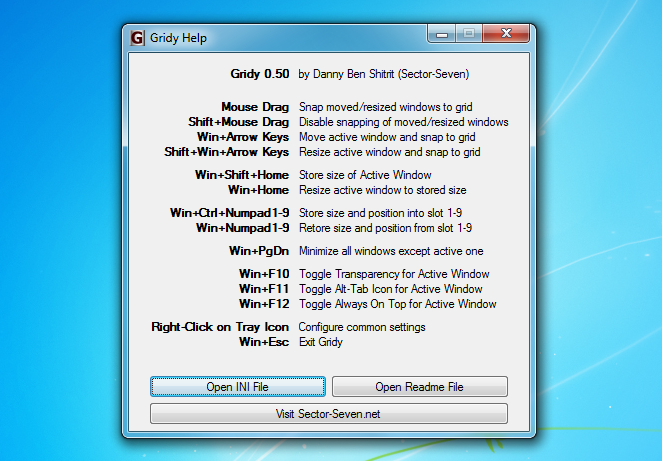
Once running, for instance, Gridy will automatically snap any windows you move or resize to an invisible grid, very useful if you want to keep them neatly aligned. You're also able to move the windows via the keyboard, just by holding down the Windows key and pressing one of the cursor keys. And if this is a problem for some reason, you can position windows as normal by holding down Shift as you drag them.

Gridy can also remember the size and position of an application window, then restore it from a hotkey.

Pressing Win+F10 will make the current window partly transparent, then switch it back to normal.

Pressing Win+F12 toggles "always on top" for the current window (so even if you click on another application, the first window will stay visible).

And Gridy has plenty of configuration options to help deliver the results you need. You can control the grid size, transparency level, key modifiers and more, far more than we expected for a tiny portable tool which consumes less than 3MB RAM.

The program has some small failings. It appears to assume that you're using the default window border sizes, for instance, so if you've tweaked them, your windows may not quite snap into the right place.

For the most part, though, it works very well, and is a simple way to take more control of your application windows.

Verdict:

Gridy is a lightweight and configurable tool with some useful windows management features

Your Comments & Opinion
 
Related Download Articles
 
Le Dimmer 1.0.0.4

Le Dimmer 1.0.0.4

Freeware

Automatically dim your entire desktop - apart from the active window

Window Size 2.2

Window Size 2.2

Freeware

Set any PC desktop window to the precise resolution of your choice

WindowSpace

WindowSpace 2.5.6

Trial Software

Take control of your windows and mimic some of the features of Windows 7

Horloger V1.0 Final

Horloger 1.0 FINAL

Freeware

A seriously sexy clock for your Windows desktop

Other Download Articles From This Category
WinRAR 5.0 Beta 6 (64-bit)

WinRAR 5.00 Beta 6 [64-bit]

Trial Software

The latest WinRAR release adds an improved RAR format

WinRAR 5.0 Beta 6 (32-bit)

WinRAR 5.00 Beta 6

Trial Software

The latest WinRAR release adds an improved RAR format

Bandizip 3

Bandizip 3.06

Freeware

A free and easy-to-use archiving tool

Directory Opus 10.5 (64-bit)

Directory Opus 10.5.2.0 (64-bit)

Trial Software

Be more productive with your PC using this superb Windows Explorer replacement

From Softwarecrew

Please wait while my feed loads

See more posts...


Spotlight: Free Full Software

Ashampoo Burning Studio 2013 (v11.0.6)

Free Full Commercial Software

Ashampoo Burning Studio 2013 is a compact, simple, but surprisingly feature-packed disc burning suite.

The program makes it easy to create simple data discs and audio CDs, for instance: just drag and drop your files onto the list area and you'll be burning the finished disc in a couple of clicks.

That's just the start, though. Burning Studio 2013 can also create data discs with customised, interactive multi-page menus, perfect if you'd like a more professional way to share and present the disc contents.

A built-in backup tool allows you to create backups which may be encrypted, compressed, and span several CDs, DVDs and Blu-rays.

And there are modules to create VCD or SVCD video projects; burn video DVDs or Blu-ray discs from prepared folders; create, browse or burn disc images (ISO, CUE/ BIN and Ashdisc formats are supported); copy discs, erase them, design and print disc covers, labels and booklets, and more.

The focus throughout is on ease of use, though, and so Ashampoo Burning Studio 2013 remains very straightforward, whatever you're doing. Most disc projects are created via the same simple interface, and for the most part all you have to do is drag and drop the necessary files. But experts will find more advanced options are only a click away, and if you need to then you can set ISO and UDF version, enable Joliet, make a disc bootable and more.

Note the download here will take you to the Downloadcrew Software Store where you can download Burning Studio 2013.

[...]
Value:
Free
Rating: