




Launching programs with a command line parameter ("prog.exe /dothis") can be awkward. Even if you're looking at the application in an Explorer window, you'll probably still have to open the Run box, or a command window, for instance, before trying to figure out the lengthy path to your executable.
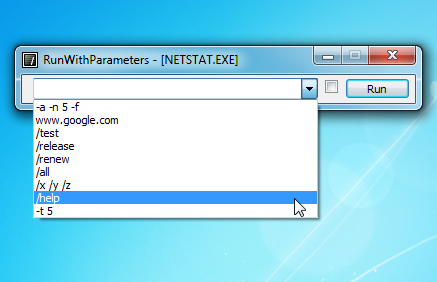
Fortunately, RunWithParameters makes this very much easier. Once installed, right-clicking an executable (or a shortcut, if you're holding Shift) displays a "Run with parameters" option. Select this, enter your parameters, click Run and the program will be launched accordingly.
RunWithParameters also maintains a history of whatever you've entered recently (and that's a history per program; you'll only see parameters relating to that application). So no need to type anything again, just select it from a list.
And there's even the option to add a "Run with parameters (as administrator)" option, if your target program needs administrative rights.
Verdict:
A small and simple time-saver
Your Comments & Opinion
Microsoft's advanced cross-platform automation tool and configuration framework
Bring the Windows command line right up to date with this powerful tool
The ultimate command line toolkit?
Run multiple command line windows from a single tabbed interface
A command prompt alternative with a modern, productivity-boosting interface
Keep your desktop in order with this icon organisation tool
Manage your files and folders with this dual pane tabbed Explorer replacement
Create, format, merge, resize, move and otherwise organise your drive partitions with this free tool
A configurable system monitor
A configurable system monitor