From Twitter

Please wait while my tweets load

If you can't wait - jump to Twitter

See more tweets...

RSS Feeds

Receive a regular RSS feed from our latest, most popular and recommended downloads

Latest downloads feed

Get a regular RSS from our most latest downloads

Most popular downloads feed

Get a regular RSS from our most popular downloads

Recommended downloads feed

Get a regular RSS from our recommended downloads

Newsletter

Subscribe to either one of our two newsletters for regular updates and information

Downloads newsletter

This is a weekly newsletter with download news, updates and other information

This is a monthly newsletter with software store information, offers and deals

mRemoteNG 1.69

Manage all your RDP, VNC, SSH, Telnet and other remote connections from one place

by Mike Williams

Our Rating:
Your Rating:
Login to rate
Based on 0 ratings
License: Open Source
Operating Systems: Windows 7 (32 bit), Windows 7 (64 bit), Windows Vista (32 bit), Windows Vista (64 bit), Windows XP
Requirements:


Languages: English
Software Cost: Free
Date Updated: 21 February 2012
Watchlist: Add download to my watchlist
Downloads To Date: 472
Developer: Riley McArdle
RSS News Feed:
Twitter Feed: http://twitter.com/#!/mRemoteNG
Buy TuneUp Utilities 2012 for only $18.99, with lifetime license, saving 62% from MSRP, only from store.downloadcrew.com
mRemoteNG 1.69
Manage all your RDP, VNC, SSH, Telnet and other remote connections from one place

MRemoteNG, a fork of the mRemote project, is a powerful and comprehensive remote connection manager.

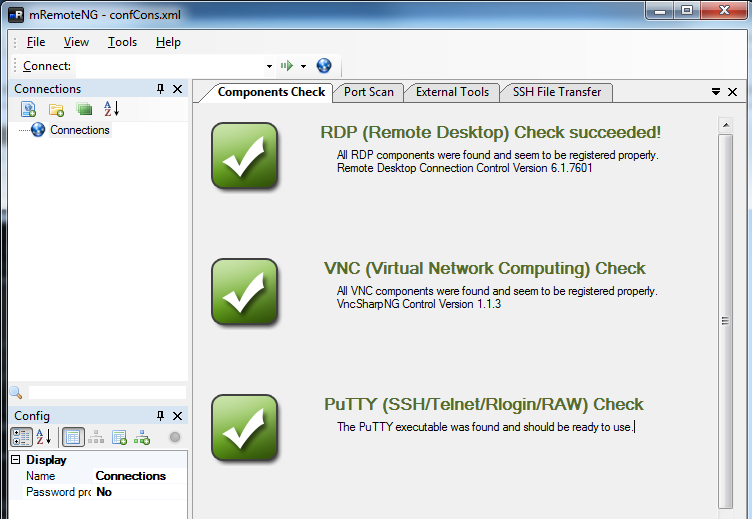
Launch the program and it'll immediately check to ensure that your system supports its various connection types: Remote Desktop, VNC, SSH/ Telnet/ Rlogin/ RAW, Citrix ICA, and more. If all is well then you'll see a reassuring green tick; if there's a problem then helpful error messages will explain what you need to do.

Once you're set up, then you can add a new connection in the Connections pane, and configure its details: host name or IP, user name, password, protocol, port and many other protocol-specific settings. So for a Remote Desktop connection, say, you're able to set up its resolution, the number of colours, whether you want to cache bitmaps, display wallpaper and themes, apply font smoothing, and more.

You can then launch any connection just by double-clicking it. Or open multiple connections, if you like (each one gets a separate tab).

And mRemoteNG includes some useful bonus features, such as a port scanner and SSH file transfer, as well as an "External Tools" option which enables you to integrate extra tools with the package.

Verdict:

A powerful and comprehensive remote connection manager

Your Comments & Opinion
 
Related Download Articles
 
WinSCP

WinSCP 4.3.7

Open Source

This easy-to-use SFTP and FTP client will protect your file transfers from snoopers

UltraVNC (64-bit)

UltraVNC 1.0.9.6.2 (64-bit)

Open Source

Easily access and use your home PC from almost anywhere

Network Stuff 3.0.8.0

Network Stuff 3.0.8

Freeware

Get Ping, Traceroute, Telnet, ARP, DNS, WhoIs and many other network functions in a single portable tool

Remote Desktop Manager 6.1.0.0 Standard Edition

Remote Desktop Manager 6.1.0.0 Standard

Freeware

Manage all your remote connections and virtual machines from one central location

Other Download Articles From This Category
NetSatMan

NetSatMan 3.4.4

Free, for personal-use only

Reconfigure your laptop's network settings at a click

SoftPerfect Network Scanner

SoftPerfect Network Scanner 5.4.3

Freeware

A quick and easy way to find out exactly what's connected to your network

PRTG Network Monitor 12

PRTG Network Monitor 12.2.1.1880

Freeware

A powerful, professional bandwidth monitor

NetworkTrafficView 1.40

NetworkTrafficView 1.40 (64-bit)

Freeware

Monitor your network and internet traffic in real time

From Softwarecrew

Please wait while my feed loads

See more posts...

Our Price: $2.95
RRP: $39.99
Saving 93%
Buy Now More Info
Offer Ends In:
 

Spotlight: Free Full Software

Giveaway: WinISO Standard 6.1.0

Free Full Commercial Software

WinISO is a very comprehensive tool which provides everything you need to create, edit and convert disc images.

If you've an image file already, for instance (ISO, CUE/ BIN, NRG, MDF, CCD, IMG and DVD formats are supported) then you can open it in a click or two, browse the image contents, and extract the files you need with a quick drag and drop.

It's just as easy to create new ISO9660, UDF, even HFS+ images. Just choose the option you need, then either manually build up your preferred file and folder structure; drag and drop your files and folders from Explorer onto the program; or create an image directly from a CD, DVD or Blu-ray disc.

Of course you can edit images, too. Is an ISO file too large for your needs, say? Open it up, locate and remove any surplus files to free up a little space.

WinISO program has full support for reading and creating bootable image files. A simple conversion tool makes it easy to convert disc images into the format you need. And the program can even mount ISO files as Explorer files, or burn images to disc when you're ready to save them.

Please note, this trial version of WinISO Standard will not save files greater than 500MB in size.

Giveaway: on Wednesday, we're giving you the full current version of WinISO Standard 6 worth $29.95. The download link here will take you to Downloadcrew Giveaway.

[...]
Time Remaining: