


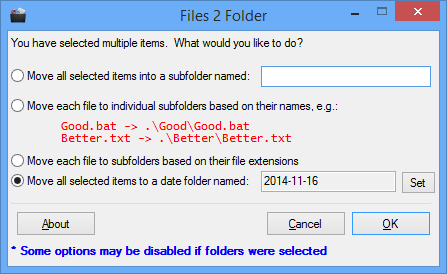
Files 2 Folder is an Explorer extension which automatically creates new folders based on the names of selected files, then sorts those files, moving them into the appropriate folder.
The program is tiny (under 1MB), adware-free, and easy enough to set up. Just run Files2Folder as an administrator, and it adds itself to your right-click menu (run the "Unregister" shortcut as an administrator if you need to remove it).
Once installed, browse to a folder, select and right-click a few files, choose the new "Files 2 Folder" option, and a dialog appears with four options.
You can have your files moved to subfolders based on their names, (David.pdf > David\David.pdf), extensions (David.pdf > PDF\David.pdf) or current date (David.pdf > 2014-11-16\David.pdf). Just select the option you need, click OK, and Files 2 Folder handles everything else.
Alternatively, enter a custom folder name of your own, click OK, and Files 2 Folder will create that subfolder and move any selected files there.
Verdict:
Files 2 Folder could be extended in many different ways, perhaps with smarter algorithms for setting the subfolder name, maybe having the option to copy files rather than move them. But it's simplicity does mean the program is very easy to use, and if you're regularly moving and sorting files then it may save you some time.
Your Comments & Opinion
Manage, view, process and share your best digital images
Resurrect Wunderlist with this almost perfect carbon copy.
Resurrect Wunderlist with this almost perfect carbon copy.
Resurrect Wunderlist with this almost perfect carbon copy.
A powerful to-do list manager that can be synchronised online
Speed up, optimise, clean and secure your PC with this all-in-one system maintenance suite
Speed up, optimise and repair your computer with this all-in-one PC maintenance and tweaking tool
Browse your hard drive with this tabbed file manager
Feature-packed Windows Explorer replacement that enables you do more with your files
Monitor your PC's temperature, voltages, CPU frequency and more with this powerful stability checker